|
-
August 9th, 2007, 12:58 AM
#1
IE 7 Keeps Restarting with Vista Home Premium?
 I have a new custom PC with an ASUS P5N-SLI main board, Intel Core 2 Duo2.13 GHZ, 2 GB DDR2 memory 667 MHZ, Western Digital 250GB SATA 7200, nVidia 7600 512MB PCI – Express and a Sony DVD RW AW-Q170A CD drive and Vista Home Premium…my previous PC had XP Pro. I have a new custom PC with an ASUS P5N-SLI main board, Intel Core 2 Duo2.13 GHZ, 2 GB DDR2 memory 667 MHZ, Western Digital 250GB SATA 7200, nVidia 7600 512MB PCI – Express and a Sony DVD RW AW-Q170A CD drive and Vista Home Premium…my previous PC had XP Pro.
Ever since I bought this PC with Vista, IE 7 will close and restart by itself maybe 3 - 5 times per day. Sometimes I get the MS message: “looking for a solution” which is a joke since it has yet to find a solution whenever I see that. Why does MS even put that message in Vista?
What might be causing IE 7 to close and restart with Vista…never happened with XP Pro?
My next computer will be a MAC!
Thanks,
Mike
-
August 9th, 2007, 12:07 PM
#2
Web site errors and XD errors.
After I turned off XD in the bios most of the IE issues went away.
-
August 10th, 2007, 04:31 PM
#3
It could also be a buggy add-on. Go to Start>All Programs>Accessories>System Tools>Internet Explorer (no-add ons), and see if that is OK.
Nick.
-
August 10th, 2007, 06:19 PM
#4
I'll try that...I'm getting Flash error messages even before my format. I did add a Logitech mouse/keyboard which I'm returning and will uninstall the software...I doubt that's doing it.
Thanks,
MIke
-
August 10th, 2007, 09:22 PM
#5
IE 7 is currently running with no add-ons. So far today, IE has not restarted.
Mike
-
August 11th, 2007, 11:09 AM
#6
OK, what you need to do then is to boot into the normal IE7, then go to Tools>Manage add-ons>Enable or Disable add-ons, and disable them all. Then it's just a matter or re-enabling the add-ons one by one until you find the culprit.
Nick.
-
August 11th, 2007, 01:29 PM
#7
Thanks! I have 5 add-ons running and I have a feeling Shockwave may be the one because of the shockwave error messages. Is Shockwave necessary for various web sites?
Mike
-
August 12th, 2007, 11:43 AM
#8
I have Shockwave disabled in mine (I too had problems and am highly suspicious that is the culprit). I haven't experienced any problems with sites since disabling it, and that was months ago.
Nick.
-
August 12th, 2007, 01:17 PM
#9
Thanks...I'll uninstall it and see if I notice improvement.
Mike
-
August 12th, 2007, 01:20 PM
#10
I don't see where I can disable it or even find it to uninstall it?
Mike
-
August 12th, 2007, 04:26 PM
#11
Go to Tools>Manage Add-ons>Enable or Disable Add-ons
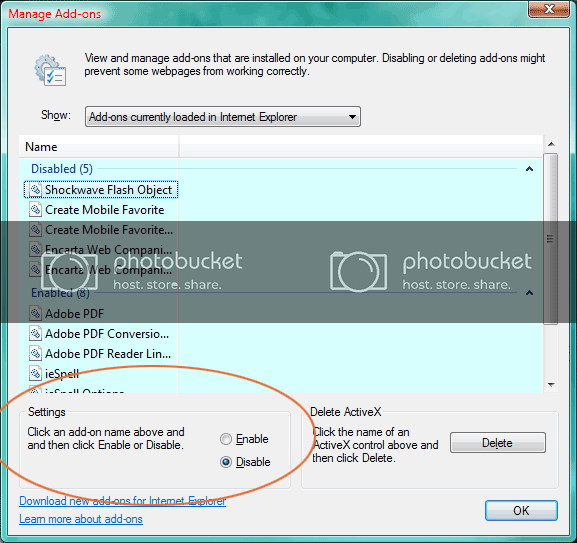
Nick.
-
August 12th, 2007, 04:45 PM
#12
Thanks...now I see it! I also disabled One Note (Office Ultimate 2007) as "some" of my printing was go to One Note and I'd have to print from there.
So far today, IE 7 has not restarted!
Thanks again for the help...now off to the store to confuse myself on Canon PowerShots...too many options!
Mike
-
August 13th, 2007, 11:19 AM
#13
You're very welcome 
Let's hope that has fixed things.
Nick.
-
August 13th, 2007, 01:33 PM
#14
No, IE 7 restarted twice last night. Right now Spy Bot is disabled...will see what happens today.
Mike
Thread Information
Users Browsing this Thread
There are currently 1 users browsing this thread. (0 members and 1 guests)
 Posting Permissions
- You may not post new threads
- You may not post replies
- You may not post attachments
- You may not edit your posts
-
Forum Rules
|
|


 Reply With Quote


