October 31st, 2009, 08:23 PM
#1
Cannot Acces "Controle Panel" and "My Computer Properties"
Hi
i can't acces to the controle panel and "My computer" properties.
My OS is Windows Vista Business 32 bit.s
i don't get any error message when trying to access to controle panel neither to "My computer " properties.
the HijackThis log file is :
Logfile of Trend Micro HijackThis v2.0.2
Scan saved at 1:20:12 AM, on 11/1/2009
Platform: Windows Vista (WinNT 6.00.1904)
MSIE: Internet Explorer v7.00 (7.00.6000.16916)
Boot mode: Normal
Running processes:
C:\Windows\system32\Dwm.exe
C:\Windows\Explorer.EXE
C:\Windows\System32\mobsync.exe
C:\Program Files\McAfee\MPS\mpsevh.exe
C:\Program Files\Apoint2K\Apoint.exe
C:\Windows\System32\igfxtray.exe
C:\Windows\System32\hkcmd.exe
C:\Windows\System32\igfxpers.exe
C:\Program Files\ltmoh\ltmoh.exe
C:\Program Files\TOSHIBA\ConfigFree\NDSTray.exe
C:\Windows\System32\ThpSrv.exe
C:\Program Files\TOSHIBA\Power Saver\TPwrMain.exe
C:\Program Files\TOSHIBA\SmoothView\SmoothView.exe
C:\Program Files\Protector Suite QL\psqltray.exe
C:\Program Files\TOSHIBA\FlashCards\TCrdMain.exe
C:\Program Files\McAfee\MSK\mskagent.exe
C:\Program Files\Google\Google Desktop Search\GoogleDesktop.exe
C:\Program Files\McAfee.com\Agent\mcagent.exe
C:\Windows\WindowsMobile\wmdc.exe
C:\Program Files\TOSHIBA\TOSCDSPD\TOSCDSPD.exe
C:\Program Files\Google\Google Desktop Search\GoogleDesktopIndex.exe
C:\Program Files\Windows Mail\WinMail.exe
C:\Program Files\Google\Google Desktop Search\GoogleDesktopCrawl.exe
C:\Program Files\TOSHIBA\ConfigFree\CFSwMgr.exe
C:\PROGRA~1\McAfee\MSC\mcregist.exe
C:\Program Files\Apoint2K\ApMsgFwd.exe
C:\Windows\system32\taskeng.exe
C:\Program Files\Apoint2K\Apntex.exe
c:\PROGRA~1\mcafee\msc\mcuimgr.exe
C:\Program Files\Internet Explorer\IEUser.exe
C:\Windows\system32\igfxext.exe
C:\Windows\system32\igfxsrvc.exe
C:\Program Files\IObit\IObit SmartDefrag\IObit SmartDefrag.exe
C:\Windows\system32\wuauclt.exe
C:\Program Files\Internet Explorer\iexplore.exe
C:\PROGRA~1\Java\jre6\bin\jp2launcher.exe
C:\Program Files\Java\jre1.6.0\bin\java.exe
C:\Users\dev\Desktop\hijackthis-2.0.2.exe
C:\Users\dev\AppData\Local\Temp\hijackthis-2.0.2.exe
C:\Program Files\Mozilla Firefox\firefox.exe
C:\Program Files\Malwarebytes' Anti-Malware\mbam.exe
R1 - HKCU\Software\Microsoft\Internet Explorer\Main,Search Page = http://go.microsoft.com/fwlink/?LinkId=54896
R0 - HKCU\Software\Microsoft\Internet Explorer\Main,Start Page = http://www.toshibadirect.com/dpdstart
R1 - HKLM\Software\Microsoft\Internet Explorer\Main,Default_Page_URL = http://www.toshibadirect.com/dpdstart
R1 - HKLM\Software\Microsoft\Internet Explorer\Main,Default_Search_URL = http://go.microsoft.com/fwlink/?LinkId=54896
R1 - HKLM\Software\Microsoft\Internet Explorer\Main,Search Page = http://go.microsoft.com/fwlink/?LinkId=54896
R0 - HKLM\Software\Microsoft\Internet Explorer\Main,Start Page = http://go.microsoft.com/fwlink/?LinkId=69157
R0 - HKLM\Software\Microsoft\Internet Explorer\Search,SearchAssistant =
R0 - HKLM\Software\Microsoft\Internet Explorer\Search,CustomizeSearch =
R0 - HKCU\Software\Microsoft\Internet Explorer\Toolbar,LinksFolderName =
O1 - Hosts: ::1 localhost
O2 - BHO: AcroIEHlprObj Class - {06849E9F-C8D7-4D59-B87D-784B7D6BE0B3} - C:\Program Files\Adobe\Acrobat 7.0\ActiveX\AcroIEHelper.dll
O2 - BHO: scriptproxy - {7DB2D5A0-7241-4E79-B68D-6309F01C5231} - c:\program files\mcafee\virusscan\scriptcl.dll
O2 - BHO: Google Toolbar Helper - {AA58ED58-01DD-4d91-8333-CF10577473F7} - c:\program files\google\googletoolbar1.dll
O2 - BHO: Java(tm) Plug-In 2 SSV Helper - {DBC80044-A445-435b-BC74-9C25C1C588A9} - C:\Program Files\Java\jre6\bin\jp2ssv.dll
O3 - Toolbar: &Google - {2318C2B1-4965-11d4-9B18-009027A5CD4F} - c:\program files\google\googletoolbar1.dll
O4 - HKLM\..\Run: [Windows Defender] %ProgramFiles%\Windows Defender\MSASCui.exe -hide
O4 - HKLM\..\Run: [Apoint] C:\Program Files\Apoint2K\Apoint.exe
O4 - HKLM\..\Run: [IgfxTray] C:\Windows\system32\igfxtray.exe
O4 - HKLM\..\Run: [HotKeysCmds] C:\Windows\system32\hkcmd.exe
O4 - HKLM\..\Run: [Persistence] C:\Windows\system32\igfxpers.exe
O4 - HKLM\..\Run: [LtMoh] C:\Program Files\ltmoh\Ltmoh.exe
O4 - HKLM\..\Run: [NDSTray.exe] NDSTray.exe
O4 - HKLM\..\Run: [PSQLLauncher] "C:\Program Files\Protector Suite QL\launcher.exe" /startup
O4 - HKLM\..\Run: [ThpSrv] C:\Windows\system32\thpsrv /logon
O4 - HKLM\..\Run: [TOSDCR] %ProgramFiles%\TOSHIBA\PasswordUtility\TOSDCR.exe
O4 - HKLM\..\Run: [TPwrMain] %ProgramFiles%\TOSHIBA\Power Saver\TPwrMain.EXE
O4 - HKLM\..\Run: [HSON] %ProgramFiles%\TOSHIBA\TBS\HSON.exe
O4 - HKLM\..\Run: [SmoothView] %ProgramFiles%\Toshiba\SmoothView\SmoothView.exe
O4 - HKLM\..\Run: [00TCrdMain] %ProgramFiles%\TOSHIBA\FlashCards\TCrdMain.exe
O4 - HKLM\..\Run: [MskAgentexe] C:\Program Files\McAfee\MSK\MskAgent.exe
O4 - HKLM\..\Run: [Google Desktop Search] "C:\Program Files\Google\Google Desktop Search\GoogleDesktop.exe" /startup
O4 - HKLM\..\Run: [mcagent_exe] C:\Program Files\McAfee.com\Agent\mcagent.exe /runkey
O4 - HKLM\..\Run: [Windows Mobile Device Center] %windir%\WindowsMobile\wmdc.exe
O4 - HKLM\..\Run: [SunJavaUpdateSched] "C:\Program Files\Java\jre6\bin\jusched.exe"
O4 - HKLM\..\RunOnce: [Malwarebytes' Anti-Malware] C:\Program Files\Malwarebytes' Anti-Malware\mbamgui.exe /install /silent
O4 - HKCU\..\Run: [TOSCDSPD] C:\Program Files\TOSHIBA\TOSCDSPD\TOSCDSPD.exe
O4 - HKCU\..\Run: [1922036909] C:\Program Files\Toshiba Registration\Registration.exe /r "C:\Program Files\Toshiba Registration\Registration.rpd"
O4 - HKUS\S-1-5-19\..\Run: [Sidebar] %ProgramFiles%\Windows Sidebar\Sidebar.exe /detectMem (User 'LOCAL SERVICE')
O4 - HKUS\S-1-5-19\..\Run: [WindowsWelcomeCenter] rundll32.exe oobefldr.dll,ShowWelcomeCenter (User 'LOCAL SERVICE')
O4 - HKUS\S-1-5-20\..\Run: [Sidebar] %ProgramFiles%\Windows Sidebar\Sidebar.exe /detectMem (User 'NETWORK SERVICE')
O8 - Extra context menu item: E&xport to Microsoft Excel - res://C:\PROGRA~1\MICROS~1\Office12\EXCEL.EXE/3000
O9 - Extra button: @C:\Windows\WindowsMobile\INetRepl.dll,-222 - {2EAF5BB1-070F-11D3-9307-00C04FAE2D4F} - C:\Windows\WindowsMobile\INetRepl.dll
O9 - Extra button: (no name) - {2EAF5BB2-070F-11D3-9307-00C04FAE2D4F} - C:\Windows\WindowsMobile\INetRepl.dll
O9 - Extra 'Tools' menuitem: @C:\Windows\WindowsMobile\INetRepl.dll,-223 - {2EAF5BB2-070F-11D3-9307-00C04FAE2D4F} - C:\Windows\WindowsMobile\INetRepl.dll
O9 - Extra button: Research - {92780B25-18CC-41C8-B9BE-3C9C571A8263} - C:\PROGRA~1\MICROS~1\Office12\REFIEBAR.DLL
O13 - Gopher Prefix:
O15 - Trusted Zone: http://*.dev-pc
O20 - AppInit_DLLs: C:\PROGRA~1\Google\GOOGLE~1\GOEC62~1.DLL
O23 - Service: Agere Modem Call Progress Audio (AgereModemAudio) - Agere Systems - C:\Windows\system32\agrsmsvc.exe
O23 - Service: ConfigFree Service (CFSvcs) - TOSHIBA CORPORATION - C:\Program Files\TOSHIBA\ConfigFree\CFSvcs.exe
O23 - Service: McAfee E-mail Proxy (Emproxy) - McAfee, Inc. - C:\PROGRA~1\COMMON~1\McAfee\EmProxy\emproxy.exe
O23 - Service: GoogleDesktopManager - Google - C:\Program Files\Google\Google Desktop Search\GoogleDesktopManager.exe
O23 - Service: InstallDriver Table Manager (IDriverT) - Macrovision Corporation - C:\Program Files\Common Files\InstallShield\Driver\1150\Intel 32\IDriverT.exe
O23 - Service: McAfee HackerWatch Service - McAfee, Inc. - C:\Program Files\Common Files\McAfee\HackerWatch\HWAPI.exe
O23 - Service: McAfee Services (mcmscsvc) - McAfee, Inc. - C:\PROGRA~1\McAfee\MSC\mcmscsvc.exe
O23 - Service: McAfee Network Agent (McNASvc) - McAfee, Inc. - c:\PROGRA~1\COMMON~1\mcafee\mna\mcnasvc.exe
O23 - Service: McAfee Scanner (McODS) - McAfee, Inc. - C:\PROGRA~1\McAfee\VIRUSS~1\mcods.exe
O23 - Service: McAfee Proxy Service (McProxy) - McAfee, Inc. - c:\PROGRA~1\COMMON~1\mcafee\mcproxy\mcproxy.exe
O23 - Service: McAfee Redirector Service (McRedirector) - McAfee, Inc. - c:\PROGRA~1\COMMON~1\mcafee\redirsvc\redirsvc.exe
O23 - Service: McAfee Real-time Scanner (McShield) - McAfee, Inc. - C:\PROGRA~1\McAfee\VIRUSS~1\mcshield.exe
O23 - Service: McAfee SystemGuards (McSysmon) - McAfee, Inc. - C:\PROGRA~1\McAfee\VIRUSS~1\mcsysmon.exe
O23 - Service: McAfee Personal Firewall Service (MpfService) - McAfee, Inc. - C:\Program Files\McAfee\MPF\MPFSrv.exe
O23 - Service: McAfee Privacy Service (MPS9) - McAfee, Inc. - C:\Program Files\McAfee\MPS\mps.exe
O23 - Service: McAfee SpamKiller Service (MSK80Service) - McAfee Inc. - C:\Program Files\McAfee\MSK\MskSrver.exe
O23 - Service: OracleDBConsoleorcl - Oracle Corporation - D:\app\dev\product\11.1.0\db_1\bin\nmesrvc.exe
O23 - Service: OracleOraDb11g_home1TNSListener - Unknown owner - D:\app\dev\product\11.1.0\db_1\BIN\TNSLSNR.exe
O23 - Service: Oracle Process Manager (asinst_1) (OracleProcessManager_asinst_1) - Unknown owner - C:\Oracle\Middleware\as_2\opmn\bin\opmn.exe
O23 - Service: OracleServiceORCL - Oracle Corporation - d:\app\dev\product\11.1.0\db_1\bin\ORACLE.EXE
O23 - Service: Oracle ORCL VSS Writer Service (OracleVssWriterORCL) - Unknown owner - D:\app\dev\product\11.1.0\db_1\bin\OraVSSW.exe
O23 - Service: pinger - Unknown owner - C:\TOSHIBA\IVP\ISM\pinger.exe
O23 - Service: Swupdtmr - Unknown owner - c:\TOSHIBA\IVP\swupdate\swupdtmr.exe
O23 - Service: TOSHIBA HDD Protection (Thpsrv) - TOSHIBA Corporation - C:\Windows\system32\ThpSrv.exe
O23 - Service: TOSHIBA Optical Disc Drive Service (TODDSrv) - TOSHIBA Corporation - C:\Windows\system32\TODDSrv.exe
O23 - Service: TOSHIBA Power Saver (TosCoSrv) - TOSHIBA Corporation - C:\Program Files\TOSHIBA\Power Saver\TosCoSrv.exe
O23 - Service: TOSHIBA Bluetooth Service - TOSHIBA CORPORATION - C:\Program Files\Toshiba\Bluetooth Toshiba Stack\TosBtSrv.exe
--
End of file - 9478 bytes
October 31st, 2009, 10:00 PM
#2
Hi and welcome to the VDr forums .
=========
Please download ComboFix by sUBs from HERE or HERE You must download it to and run it from your Desktop Physically disconnect from the internet. Now STOP all your monitoring programs (Antivirus/Antispyware, Guards and Shields) as they could easily interfere with ComboFix. Double click combofix.exe & follow the prompts. When finished, it will produce a log. Please save that log to post in your next reply along with a fresh HJT log Re-enable all the programs that were disabled during the running of ComboFix..
Note:
Do not mouse-click combofix's window while it is running. That may cause it to stall.
CF disconnects your machine from the internet. The connection is automatically restored before CF completes its run. If CF runs into difficulty and terminates prematurely , the connection can be manually restored by restarting your machine.
Run Combofix ONCE only!!
November 7th, 2009, 11:43 AM
#3
combofix log and HJT fresh log
Hi, tahnsk for your reply.
I've did the mentined step. I'll attach the combofix log and the HJT log with the thread.
thanks
Pierre Alam
Logfile of Trend Micro HijackThis v2.0.2
Scan saved at 5:29:25 PM, on 11/7/2009
Platform: Windows Vista (WinNT 6.00.1904)
MSIE: Internet Explorer v7.00 (7.00.6000.16916)
Boot mode: Normal
Running processes:
C:\Windows\system32\Dwm.exe
C:\Program Files\McAfee\MPS\mpsevh.exe
c:\PROGRA~1\mcafee.com\agent\mcagent.exe
C:\Windows\system32\taskeng.exe
C:\Program Files\Apoint2K\Apoint.exe
C:\Windows\System32\igfxtray.exe
C:\Windows\System32\hkcmd.exe
C:\Windows\System32\igfxpers.exe
C:\Program Files\ltmoh\ltmoh.exe
C:\Windows\System32\ThpSrv.exe
C:\Program Files\TOSHIBA\Power Saver\TPwrMain.exe
C:\Program Files\TOSHIBA\SmoothView\SmoothView.exe
C:\Program Files\Protector Suite QL\psqltray.exe
C:\Program Files\TOSHIBA\FlashCards\TCrdMain.exe
C:\Program Files\McAfee\MSK\mskagent.exe
C:\Program Files\Google\Google Desktop Search\GoogleDesktop.exe
C:\Program Files\Apoint2K\ApMsgFwd.exe
C:\Program Files\Google\Google Desktop Search\GoogleDesktopIndex.exe
C:\Windows\WindowsMobile\wmdc.exe
C:\Program Files\Java\jre6\bin\jusched.exe
C:\Program Files\TOSHIBA\TOSCDSPD\TOSCDSPD.exe
C:\Windows\System32\mobsync.exe
C:\Program Files\Apoint2K\Apntex.exe
C:\Program Files\Google\Google Desktop Search\GoogleDesktopCrawl.exe
C:\Program Files\Windows Mail\WinMail.exe
c:\PROGRA~1\mcafee\msc\mcuimgr.exe
C:\Windows\helppane.exe
C:\Windows\system32\notepad.exe
C:\Windows\Explorer.exe
c:\PROGRA~1\mcafee\VIRUSS~1\mcvsshld.exe
C:\Users\dev\Desktop\hijackthis-2.0.2.exe
C:\Windows\system32\SearchFilterHost.exe
C:\Program Files\Internet Explorer\iexplore.exe
C:\Program Files\Internet Explorer\IEUser.exe
C:\Users\dev\AppData\Local\Temp\hijackthis-2.0.2.exe
R0 - HKCU\Software\Microsoft\Internet Explorer\Main,Start Page = http://www.toshibadirect.com/dpdstart
R1 - HKLM\Software\Microsoft\Internet Explorer\Main,Default_Page_URL = http://go.microsoft.com/fwlink/?LinkId=69157
R1 - HKLM\Software\Microsoft\Internet Explorer\Main,Default_Search_URL = http://go.microsoft.com/fwlink/?LinkId=54896
R1 - HKLM\Software\Microsoft\Internet Explorer\Main,Search Page = http://go.microsoft.com/fwlink/?LinkId=54896
R0 - HKLM\Software\Microsoft\Internet Explorer\Main,Start Page = http://go.microsoft.com/fwlink/?LinkId=69157
R0 - HKCU\Software\Microsoft\Internet Explorer\Toolbar,LinksFolderName =
O1 - Hosts: ::1 localhost
O2 - BHO: AcroIEHlprObj Class - {06849E9F-C8D7-4D59-B87D-784B7D6BE0B3} - C:\Program Files\Adobe\Acrobat 7.0\ActiveX\AcroIEHelper.dll
O2 - BHO: scriptproxy - {7DB2D5A0-7241-4E79-B68D-6309F01C5231} - c:\program files\mcafee\virusscan\scriptcl.dll
O2 - BHO: Google Toolbar Helper - {AA58ED58-01DD-4d91-8333-CF10577473F7} - c:\program files\google\googletoolbar1.dll
O2 - BHO: Java(tm) Plug-In 2 SSV Helper - {DBC80044-A445-435b-BC74-9C25C1C588A9} - C:\Program Files\Java\jre6\bin\jp2ssv.dll
O3 - Toolbar: &Google - {2318C2B1-4965-11d4-9B18-009027A5CD4F} - c:\program files\google\googletoolbar1.dll
O4 - HKLM\..\Run: [Windows Defender] %ProgramFiles%\Windows Defender\MSASCui.exe -hide
O4 - HKLM\..\Run: [Apoint] C:\Program Files\Apoint2K\Apoint.exe
O4 - HKLM\..\Run: [IgfxTray] C:\Windows\system32\igfxtray.exe
O4 - HKLM\..\Run: [HotKeysCmds] C:\Windows\system32\hkcmd.exe
O4 - HKLM\..\Run: [Persistence] C:\Windows\system32\igfxpers.exe
O4 - HKLM\..\Run: [LtMoh] C:\Program Files\ltmoh\Ltmoh.exe
O4 - HKLM\..\Run: [NDSTray.exe] NDSTray.exe
O4 - HKLM\..\Run: [PSQLLauncher] "C:\Program Files\Protector Suite QL\launcher.exe" /startup
O4 - HKLM\..\Run: [ThpSrv] C:\Windows\system32\thpsrv /logon
O4 - HKLM\..\Run: [TOSDCR] %ProgramFiles%\TOSHIBA\PasswordUtility\TOSDCR.exe
O4 - HKLM\..\Run: [TPwrMain] %ProgramFiles%\TOSHIBA\Power Saver\TPwrMain.EXE
O4 - HKLM\..\Run: [HSON] %ProgramFiles%\TOSHIBA\TBS\HSON.exe
O4 - HKLM\..\Run: [SmoothView] %ProgramFiles%\Toshiba\SmoothView\SmoothView.exe
O4 - HKLM\..\Run: [00TCrdMain] %ProgramFiles%\TOSHIBA\FlashCards\TCrdMain.exe
O4 - HKLM\..\Run: [MskAgentexe] C:\Program Files\McAfee\MSK\MskAgent.exe
O4 - HKLM\..\Run: [Google Desktop Search] "C:\Program Files\Google\Google Desktop Search\GoogleDesktop.exe" /startup
O4 - HKLM\..\Run: [mcagent_exe] C:\Program Files\McAfee.com\Agent\mcagent.exe /runkey
O4 - HKLM\..\Run: [Windows Mobile Device Center] %windir%\WindowsMobile\wmdc.exe
O4 - HKLM\..\Run: [SunJavaUpdateSched] "C:\Program Files\Java\jre6\bin\jusched.exe"
O4 - HKCU\..\Run: [TOSCDSPD] C:\Program Files\TOSHIBA\TOSCDSPD\TOSCDSPD.exe
O8 - Extra context menu item: E&xport to Microsoft Excel - res://C:\PROGRA~1\MICROS~1\Office12\EXCEL.EXE/3000
O9 - Extra button: @C:\Windows\WindowsMobile\INetRepl.dll,-222 - {2EAF5BB1-070F-11D3-9307-00C04FAE2D4F} - C:\Windows\WindowsMobile\INetRepl.dll
O9 - Extra button: (no name) - {2EAF5BB2-070F-11D3-9307-00C04FAE2D4F} - C:\Windows\WindowsMobile\INetRepl.dll
O9 - Extra 'Tools' menuitem: @C:\Windows\WindowsMobile\INetRepl.dll,-223 - {2EAF5BB2-070F-11D3-9307-00C04FAE2D4F} - C:\Windows\WindowsMobile\INetRepl.dll
O9 - Extra button: Research - {92780B25-18CC-41C8-B9BE-3C9C571A8263} - C:\PROGRA~1\MICROS~1\Office12\REFIEBAR.DLL
O15 - Trusted Zone: http://*.dev-pc
O20 - AppInit_DLLs: C:\PROGRA~1\Google\GOOGLE~1\GoogleDesktopNetwork3.dll
O23 - Service: Agere Modem Call Progress Audio (AgereModemAudio) - Agere Systems - C:\Windows\system32\agrsmsvc.exe
O23 - Service: ConfigFree Service (CFSvcs) - TOSHIBA CORPORATION - C:\Program Files\TOSHIBA\ConfigFree\CFSvcs.exe
O23 - Service: McAfee E-mail Proxy (Emproxy) - McAfee, Inc. - C:\PROGRA~1\COMMON~1\McAfee\EmProxy\emproxy.exe
O23 - Service: GoogleDesktopManager - Google - C:\Program Files\Google\Google Desktop Search\GoogleDesktopManager.exe
O23 - Service: InstallDriver Table Manager (IDriverT) - Macrovision Corporation - C:\Program Files\Common Files\InstallShield\Driver\1150\Intel 32\IDriverT.exe
O23 - Service: McAfee HackerWatch Service - McAfee, Inc. - C:\Program Files\Common Files\McAfee\HackerWatch\HWAPI.exe
O23 - Service: McAfee Services (mcmscsvc) - McAfee, Inc. - C:\PROGRA~1\McAfee\MSC\mcmscsvc.exe
O23 - Service: McAfee Network Agent (McNASvc) - McAfee, Inc. - c:\PROGRA~1\COMMON~1\mcafee\mna\mcnasvc.exe
O23 - Service: McAfee Scanner (McODS) - McAfee, Inc. - C:\PROGRA~1\McAfee\VIRUSS~1\mcods.exe
O23 - Service: McAfee Proxy Service (McProxy) - McAfee, Inc. - c:\PROGRA~1\COMMON~1\mcafee\mcproxy\mcproxy.exe
O23 - Service: McAfee Redirector Service (McRedirector) - McAfee, Inc. - c:\PROGRA~1\COMMON~1\mcafee\redirsvc\redirsvc.exe
O23 - Service: McAfee Real-time Scanner (McShield) - McAfee, Inc. - C:\PROGRA~1\McAfee\VIRUSS~1\mcshield.exe
O23 - Service: McAfee SystemGuards (McSysmon) - McAfee, Inc. - C:\PROGRA~1\McAfee\VIRUSS~1\mcsysmon.exe
O23 - Service: McAfee Personal Firewall Service (MpfService) - McAfee, Inc. - C:\Program Files\McAfee\MPF\MPFSrv.exe
O23 - Service: McAfee Privacy Service (MPS9) - McAfee, Inc. - C:\Program Files\McAfee\MPS\mps.exe
O23 - Service: McAfee SpamKiller Service (MSK80Service) - McAfee Inc. - C:\Program Files\McAfee\MSK\MskSrver.exe
O23 - Service: OracleDBConsoleorcl - Oracle Corporation - D:\app\dev\product\11.1.0\db_1\bin\nmesrvc.exe
O23 - Service: OracleOraDb11g_home1TNSListener - Unknown owner - D:\app\dev\product\11.1.0\db_1\BIN\TNSLSNR.exe
O23 - Service: Oracle Process Manager (asinst_1) (OracleProcessManager_asinst_1) - Unknown owner - C:\Oracle\Middleware\as_2\opmn\bin\opmn.exe
O23 - Service: OracleServiceORCL - Oracle Corporation - d:\app\dev\product\11.1.0\db_1\bin\ORACLE.EXE
O23 - Service: Oracle ORCL VSS Writer Service (OracleVssWriterORCL) - Unknown owner - D:\app\dev\product\11.1.0\db_1\bin\OraVSSW.exe
O23 - Service: pinger - Unknown owner - C:\TOSHIBA\IVP\ISM\pinger.exe
O23 - Service: Swupdtmr - Unknown owner - c:\TOSHIBA\IVP\swupdate\swupdtmr.exe
O23 - Service: TOSHIBA HDD Protection (Thpsrv) - TOSHIBA Corporation - C:\Windows\system32\ThpSrv.exe
O23 - Service: TOSHIBA Optical Disc Drive Service (TODDSrv) - TOSHIBA Corporation - C:\Windows\system32\TODDSrv.exe
O23 - Service: TOSHIBA Power Saver (TosCoSrv) - TOSHIBA Corporation - C:\Program Files\TOSHIBA\Power Saver\TosCoSrv.exe
O23 - Service: TOSHIBA Bluetooth Service - TOSHIBA CORPORATION - C:\Program Files\Toshiba\Bluetooth Toshiba Stack\TosBtSrv.exe
--
End of file - 8287 bytes
Attached Files
November 7th, 2009, 08:10 PM
#4
Comobofix removed a few items and the hijackthis log is clean.
How is the pc?
November 7th, 2009, 08:30 PM
#5
the probleme has not been resolved
hi crunchie
the probleme has not been resolved
I still can't acces to 'Control Panel" and the properties of "My computer"..
Any ideas please??
thanks
November 7th, 2009, 08:34 PM
#6
Download Malwarebytes' Anti-Malware (http://www.majorgeeks.com/Malwarebyt...are_d5756.html ) to your desktop.
* Double-click mbam-setup.exe and follow the prompts to install the program.
* At the end, be sure to checkmark the Update Malwarebytes' Anti-Malware and Launch Malwarebytes' Anti-Malware , then click Finish.
* If an update is found, it will download and install the latest version.
* Download the update from here if you have problems.
* Once the program has loaded, select Perform full scan , then click Scan.
* When the scan is complete, click OK, then Show Results to view the results.
* Be sure that everything is checked, and click Remove Selected .
* When completed, a log will open in Notepad.
* Post the log back here .
The log can also be found here:
C:\Documents and Settings\Username\Application Data\Malwarebytes\Malwarebytes' Anti-Malware\Logs\log-date.txt
Or at C:\Program Files\Malwarebytes' Anti-Malware\Logs\log-date.txt
Make sure that you restart the computer.
November 8th, 2009, 09:10 AM
#7
Malwarebyte scan ...
Hi crunchie.
i dowloaded the malware byte and i full scan my computer.
there were no infected file to delete.
i'll attach the log file.
thanks
Attached Files
November 8th, 2009, 04:44 PM
#8
Download DDS from the following location:
DDS Tool
Save dds.scr to the desktop
Disable any script-blocking programs and then double-click on the DDS.scr icon to start the program. If you did not disable a script-blocker that may be part of your antimalware program, you may receive a warning from your antimalware product asking if you would like DDS.scr to run. Please allow it to do so.
Once you double-click the icon a Windows security warning may also appear asking if you are sure you would like to run the program. Click on the Run button to start DDS . If no warning appeared, then you should just continue.
DDS will now display a small black window providing information as to what DDS is doing on your computer.
DDS will now start scanning your computer and compiling a variety of information about what programs are starting on your computer, what files have been recently created, and the general configuration of your computer. When DDS has finished scanning, all of this information will be compiled and be displayed in two Notepad windows named dds.txt and attach.txt .
You will then be shown a small box giving instructions as to what you should do with these files. Feel free to close this message box by pressing the OK button.
We now need to save the two log files that were created. First click on the DDS.txt window and click on the File menu and then select Save As ... menu option.
Save DDS.txt to the desktop. Now click on the Attach.txt Notepad window and save that to the desktop also.
Copy the contents of the DDS.txt log and paste it into your reply here.
Attach the attach.txt log with your reply using Reply to Thread button, then the Manage Attachments button.
=========
I also recommend that you install service pack 1 as that may also rectify the problems you are having.
November 8th, 2009, 06:18 PM
#9
DDS results
hi
I intalled the DDS and run it.
Attached are the results .
i didn't had enogh space to paste the DDS.TXT file so i upload it.
thanks.
Attached Files
November 8th, 2009, 09:27 PM
#10
Please go to Jotti's or to virustotal and have these files scanned. Post the results back here.
c:\windows\sed.exe
c:\windows\PEV.exe
November 14th, 2009, 07:30 AM
#11
Result of scanning sed.exe and PEV.exe
Hi
please find below the results of scanning the files (c:\windows\sed.exe
c:\windows\PEV.exe) with both jotti's and virustotal sites:
-----------------------------------------------------------------------
Jotti's malware scan :
-----
Filename: sed.exe
Status: Scan finished. 0 out of 21 scanners reported malware.
Scan taken on: Sat 14 Nov 2009 12:12:39 (CET) Permalink
Filename: PEV.exe
Status: Scan finished. 1 out of 20 scanners reported malware.
Scan taken on: Sat 14 Nov 2009 12:21:43 (CET) Permalink
the Scanner who find malware is :
CP Secure : 2009-11-14 : BackDoor.W32.Agent.akon
the link to the result :
http://virusscan.jotti.org/en/scanre...f0f1d65c6352fb
------------------------------------------------------------
Virustotal :
------
File sed.exe received on 2009.11.14 11:17:34 (UTC)
Current status: Loading ... queued waiting scanning finished NOT FOUND STOPPED
Result: 0/41 (0%)
File PEV.exe received on 2009.11.14 11:24:00 (UTC)
Current status: Loading ... queued waiting scanning finished NOT FOUND STOPPED
Result: 3/41 (7.32%)
the link to the result is :
http://www.virustotal.com/analisis/7...74-1258197840#
Tnaks
File sed.exe received on 2009.11.14 11:17:34 (UTC)
Current status: Loading ... queued waiting scanning finished NOT FOUND STOPPED
Result: 0/41 (0%)
November 14th, 2009, 08:51 PM
#12
1. Please open Notepad Click Start , then Run Type notepad.exe in the Run Box.
2. Now copy/paste the entire content of the codebox below into the Notepad window:
Code:
FileLook::
c:\windows\sed.exe
c:\windows\PEV.exe
Note: the above code was created specifically for this user. If you are not this user, do NOT follow these directions as they could damage the workings of your system.
3. Save the above as CFScript.txt
4. Physically disconnect from the internet.
5. Now STOP all your monitoring programs (Antivirus/Antispyware, Guards and Shields) as they could easily interfere with ComboFix.
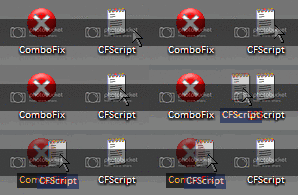
6. Then drag the CFScript.txt into ComboFix.exe as depicted in the animation below. This will start ComboFix again.
7. After reboot, (in case it asks to reboot), please post the following reports/logs into your next replyafter you re-enable all the programs that were disabled during the running of ComboFix:Combofix.txt A new HijackThis log .
Please take note :
CF disconnects your machine from the internet. The connection is automatically restored before CF completes its run. If CF runs into difficulty and terminates prematurely , the connection can be manually restored by restarting your machine.
Thread Information
Users Browsing this Thread
There are currently 1 users browsing this thread. (0 members and 1 guests)
Posting Permissions
You may not post new threads
You may not post replies
You may not post attachments
You may not edit your posts
Forum Rules