|
-
June 4th, 2009, 12:21 PM
#1
I think my Epson Printer is dying....
Hi there,
The problem; My Epson Stylus Color 880/880i printer won't print. The power button, the paper jam button and both ink buttons are flashing. According to the manual, when all the lights flash--"the printer may have an internal error". I've turned it off and on, I've uninstalled/reinstalled (using the printer software CD) and all of the lights are still flashing. Leading up to this was a couple of dozen color prints that were not as good as quality as usual. In fact, to get a good color print (on matte-finish heavy paper, covering the entire sheet size of 8.5"x11") I was having to clean the nozzle after 5 or 6 prints. My first thought was, okay--it's pretty old--about 10 years. My second thought was, can it be fixed? It's been a tank, and I've never had any problems until now. I did start using a generic ink awhile back instead of Epson ink. I think this might be the reason that I was having to clean the nozzles more than usual. but would that cause an "internal error"?
It's plugged into my Lenovo R61 Laptop (with Windows Vista) with a USB plug which is in turn plugged into a 4-Port Mini USB Hub. Don't know what more info I can give you, but I sure will appreciate any advice you can offer!
Thank you!
-
June 4th, 2009, 02:30 PM
#2
Its possible that the waste ink pads internal to the printer are full, which usually needs the pads replacing or the old ones taken out cleaned, dried and reset.
Download the SSC Service utility from http://www.inkjetprinterhelp.us/epsonSSC.html (i think it supports the 880 at least).
Follow the instructions on the webpage for installing, on the config tab make sure both installed printers and printer model read the same.
Then right click the icon in the taskbar notification area (system tray), and select Protection Counter - show current value.
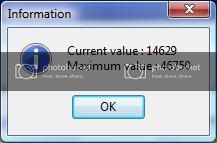
If the current value and maximum value are close then its possible that triggered the alert, in that case, Protection Counter - reset protection counter and say yes when asked it you replaced the pads.
However a full pad will eventually overflow, which is why many people modifiy epsons to divert waste ink to a small bottle outside the printer instead of the pads.
Last edited by General Winters; June 4th, 2009 at 02:33 PM.
-
June 4th, 2009, 02:43 PM
#3
I think you got your money's worth out of this printer so I wouldn't spend much time or money trying to repair it. However, there is a slight chance the following may "fix" it:
- Turn the printer off for a few seconds.
- Turn the printer on while holding down both the ink and paper buttons.
- When the paper light flashes release both buttons,
- Press and hold down the ink button until the lights stop flashing (may take a while - up to a minute)
The fix may be temporary.
-
June 4th, 2009, 05:00 PM
#4
I tried both solutions and here's what happened. First I went to the link suggested by General Winters. I tried 3 times to install the service utility. Each time this message came up:
"C:\Program Files\SSC Service Utility\ssc_serv.exe
An error occurred while trying to copy a file:
The source file is corrupted. Click Retry to try again, Ignore to skip this file (not recommended), or Abort to cancel installation."
So I aborted each time. I checked to see if my Epson printer model 880 was supported by the service utility and it was listed. Then I tried Jerry CTX's button pushing method. It worked--the printer is working normally. The lights stopped flashing and I just printed a couple of documents with no problems. So then I went back to try to install the SSC Service Utility, and the error message came up again. I would like to be able to install that Utility--up until today I did not know that the printer had waste inkpads, let alone that they fill up and need to be cleaned or replaced. Any more suggestions?
Thank you for your great advice--I do have another newer printer, but I've still got several ink cartridges for this old 880, and I'd like to be able to use them up.
-
June 4th, 2009, 06:27 PM
#5
First, I should have mentioned in my first post that the procedure may need to be executed two or three times before it works.
Second, The cause may have been related to the pad overflow counter as described in General Winters post so watch for spilled ink. Maybe put a few paper towels in the bottom.
If the error occurs again, you may want to reset the overflow counter. If you can't get the General's procedure to work, Epson will reluctantly send you a program to reset (after you agree that you will not hold them responsible if it causes scurvy, sink holes or a disturbance in the space-time continuum):
http://www.epson.com/cgi-bin/Store/s...nkPadsForm.jsp
Thread Information
Users Browsing this Thread
There are currently 1 users browsing this thread. (0 members and 1 guests)
 Posting Permissions
- You may not post new threads
- You may not post replies
- You may not post attachments
- You may not edit your posts
-
Forum Rules
|
|


 Reply With Quote


