|
-
May 16th, 2009, 12:55 PM
#1
usb port malfunction
I have an IBM R60 think pad running windows xp. I have pc tools firewall and spyware doctor with antivirus. I recently had a virus on the computer and removed it with help from this site(see trojan vundo H by flivermo in hijack this log files). I am not positive if it is related but somewhere in the process the usb ports stopped working properly.
When i plug my printer in, nothing happens. The computer doesn't even recognize its there. When i plud a usb flash drive in, the computer recognizes it is there but i cant open it (I have tried many of them). On the device manager window it says this device is not working properly. I cant update the drivers because it tells me they are up to date.
I also have another problem when i restart my computer the speakers work for an unknown amount of time but as the computer sits for a while, it seems the computer forgets there are even speakers on it. The computer says there is no device connected. This problem also seems to have appeared during the removal of the virus.
-
May 16th, 2009, 02:51 PM
#2
Boot to SAFE MODE, go into Device manager, expand USB.
Now remove every instance of usb.
Rebbot to windows and Windows should pick the usb up and install the correct drivers.
Now test your USB.
-
May 17th, 2009, 08:38 PM
#3
It worked. That was what i though i should do but i wasn't sure.
Now for the other problem with the speakers. As i described before they work for a while every time i restart the computer. I'm not sure exactly what triggers it but they just don't work and the computer doesn't even recognize that there are speakers. It says there is no device. This usually happens when i leave it on over night.
Any ideas on this one?
-
May 17th, 2009, 10:16 PM
#4
Are you using hibernation, standby or something like that?
I shut down my laptop when not use and have no idea if my sound even works. So hopefully some one can step in and help out there.
-
May 18th, 2009, 07:33 AM
#5
I woke up this morning and my usb is malfunctioning again. I deleted the drivers and let them reinstall after i restarted the computer. It works again. It seems to be acting the same as the speakers.
As for my desktop settings, i make may computer do nothing when i shut the lid. I use no hibernation, sleep or anything like that. Everything is turned to (never) under my power options. Even my screen saver is set to none. These setting are turned this way because I run defrags and other scans that are interrupted when the screen saver comes on.
-
May 18th, 2009, 10:42 AM
#6
Whay operating system are you using?
-
May 18th, 2009, 08:55 PM
#7
-
May 25th, 2009, 11:35 PM
#8
-
May 26th, 2009, 11:04 AM
#9
XP
SP3 is installed I hope.
If it were mine, I'd say it is getting right close to time to do a clean install of XP.
But, first, go into device manager, expand the usb
Right click each hub and select properties.
Power management tab
Now remove the CHECK mark allowing the shutdown of USB.
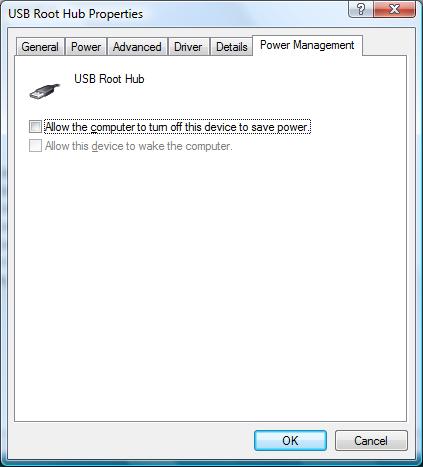
A link on how to do that.
http://www.devicedriverfinder.com/bl...-usb-root-hubs
-
June 29th, 2009, 01:46 PM
#10
USB malfunction
Train,
I have read the inputs you have provided on this subject, back in May of 2009. I followed the routine you provided [removing the USB from device manager and letting the system reinstall them.] I can't get the system to reconize my e: and f: drives [DVD and CD]
I am running a HP 1500 with XP SP3 with 256 RAM. Any added suggestions?
-
June 29th, 2009, 02:01 PM
#11
Remove the filters in the regs.
Extracted these instructions.
In order to delete upper and lower filters you're going to have to edit the registry. The usual cautions apply. If the registry is not edited properly your whole system can crash.
1) Close all open programs
2) Click on Start, Run, and type REGEDIT and press Enter
3) Click on the plus signs (+) next to the following folders
* HKEY_LOCAL_MACHINE
* SYSTEM
* CurrentControlSet
* Control
* Class
* {4D36E965-E325-11CE-
BFC1-08002BE10318}
4) This folder is the DVD/CD-ROM Drive Class Description in the registry. Look for any of the following names in the right hand column.
* UpperFilters
* LowerFilters
* UpperFilters.bak
* LowerFilters.bak
5) If any of the above keys shown in step 4 are listed, right-click on them and choose Delete
6) After deleting the keys, close the Registry Editor
7) Reboot your computer
8) Open My Computer and check to see if your CD or DVD drives have returned. You may also want to open Device Manager and verify that the yellow exclamation and error code on the CD or DVD drive is gone
Even though they are USB connected, they are Burners.
-
June 30th, 2009, 11:13 AM
#12
When my hands get steady, I will go into the regs. Tnks
-
June 30th, 2009, 12:49 PM
#13
You're Welcome!
I will admit getting irate and doing a clean install for something like that in the past. 
-
June 30th, 2009, 10:37 PM
#14
 USB USB
Train,
I got thru the instructions fine. Both slots are avail. But - I could not get the [HP1310] CD program to start or even be seen [icon] on the monitor. What now?
-
July 1st, 2009, 09:19 PM
#15
Sorry, was on the road.
Other than what I posted, I am at a lost.
Thread Information
Users Browsing this Thread
There are currently 1 users browsing this thread. (0 members and 1 guests)
 Posting Permissions
- You may not post new threads
- You may not post replies
- You may not post attachments
- You may not edit your posts
-
Forum Rules
|
|


 Reply With Quote

