|
-
August 21st, 2008, 04:22 PM
#1
Anti-Malware toolkit
HERE
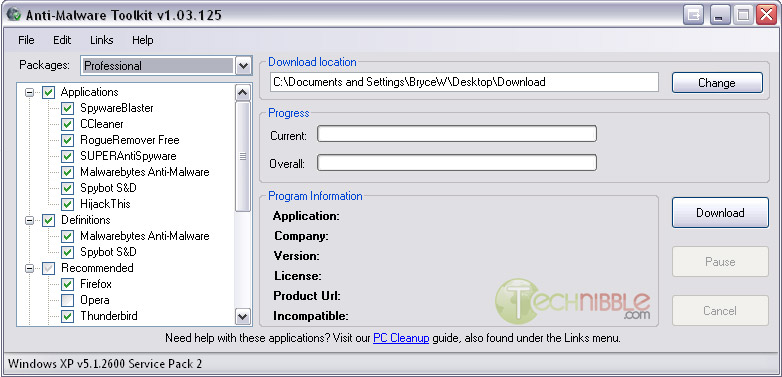
Anti-Malware toolkit is a free, portable application designed to bulk download the most recent versions of the tools we use for malware removal and put them in a designated directory (such as your USB thumb drive). Just tick the boxes of the software you want and press Download.
It has options to download the following software as the main malware removal applications:
SpywareBlaster, CCleaner, RogueRemover Free, SUPERAntiSpyware, Malwarebytes Anti-Malware, Spybot S&D, HijackThis
It also has the option to download the most recent definitions for Malwarebytes Anti-Malware and Spybot S&D. The software then has a “Recommended” section that gives you the option to download Firefox, Opera, Thunderbird, Avast, AntiVir, Comodo Firewall Pro and UPHClean.
It also provides the option to download a handful of common repair utilities such as Dial-a-fix, JavaRa, Autoruns, Process Explorer, Unlocker, LSPFix and Windows Installer Cleanup.
This is a handy tool to keep the installers on your USB Drive up to date.
-
August 21st, 2008, 07:47 PM
#2
If you could also run the applications from this toolkit that would be awesome. I suppose you could install them onto the thumb drive but that sounds like work to me
SANITY IS JUST A STATE OF MIND
-
August 21st, 2008, 07:51 PM
#3
Well, I have all installation files for all those programs (and more) loaded into a thumb drive, so I can go anywhere, and work on any computer, using my flash drive.
Thread Information
Users Browsing this Thread
There are currently 1 users browsing this thread. (0 members and 1 guests)
 Posting Permissions
- You may not post new threads
- You may not post replies
- You may not post attachments
- You may not edit your posts
-
Forum Rules
|
|


 Reply With Quote


