|
-
September 17th, 2005, 03:53 PM
#1
Sims 2 DirectX problem.
I have finally gotten the video card to work and everything, but now whenever I try to play Sims I get the following message:
"Failed to find any directx9.0c compatible graphics adapter and have installed the latest drivers provided by the manufacture. This application will now terminate."
I know that this could mean that my video card is not compatible with DirectX, but this cannot be because my boyfriend has the same computer and when he put my video card in and installed Sims, everything worked perfectly. How come it is any different for me? If you have any idea on how I can fix this, please let me know.
I have spent hours looking all over the internet trying different instructions, nothing has helped. I have spent 75 dollars on this game so far and have had it since it first came out, yet have not been able to play it. This is getting extremely ridiculous.
-
September 17th, 2005, 04:44 PM
#2
What video card are you actually using ?
Do you actually have directx9.0c installed ? Try going to start-run , typing dxdiag and pressing return to start the DirectX diagnostic tool, that will tell you what you have installed, plus you can check through all the tabs to see everything is enabled and run the tests.
Current PC
Zoostorm
Windows 7 Home Premium 64bit, (XP Mode virtual pc enabled)
WEI 7.4, 7.6, 7.9, 7.9, 5.9
Intel Core i5-2310, 8GB Ram
Geforce GTX 660 OC
Samsung Syncmaster SA300 23.6" monitor
Folding@home
User Name Sintares
Team guru3d
There is no such thing as overkill. 'Open fire' and 'is it dead?' are the only sane options when threatened.
-
September 17th, 2005, 05:14 PM
#3
I'm using a NVIDIA GeForce2 MX 100/200.
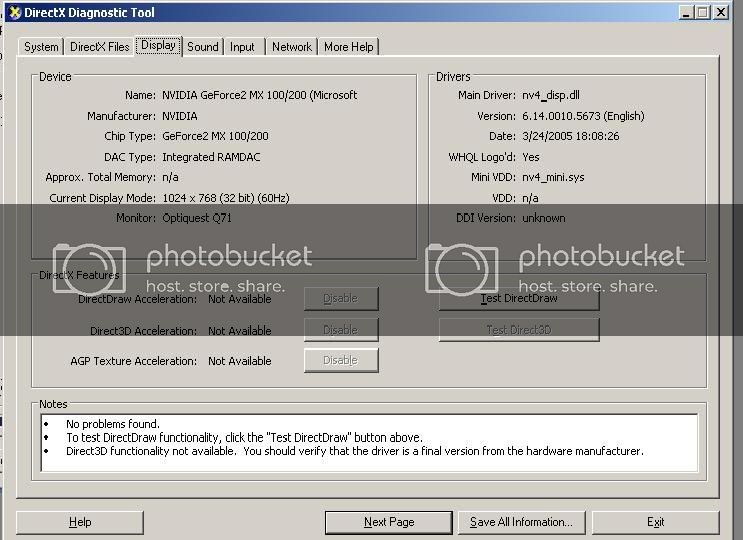
Yes, DirectX 9.0c is installed, and I have run DX Diag... the test said everything was working properly, but here's the thing... My boyfriend said that something is wrong with the DirectX features:
-
September 17th, 2005, 05:35 PM
#4
Right click a clear area of your desktop, select properties - settings - click the advanced button, then select the performance tab
Check the hardware acceleration slider is all the way to the right, if not change it, apply - ok - close, and reboot when asked.
Rerun the dxdiag test and check the display tab to see if the acceleration features are available/enabled.
If that does not work,then download fresh drivers preferably from the video card manufacturers site, then reboot in safe mode, check device manager for any phantom or duplicate references to the video card, remove the duplicates.
Reboot then uninstall your card and its drivers/software as per the cards instructions, then reinstall with the new drivers.
Reboot again and try the dxdiag test again.
These instructions might be slightly different depending on which version of windows you are running, which version do you have ?
Last edited by General Winters; September 17th, 2005 at 05:38 PM.
Current PC
Zoostorm
Windows 7 Home Premium 64bit, (XP Mode virtual pc enabled)
WEI 7.4, 7.6, 7.9, 7.9, 5.9
Intel Core i5-2310, 8GB Ram
Geforce GTX 660 OC
Samsung Syncmaster SA300 23.6" monitor
Folding@home
User Name Sintares
Team guru3d
There is no such thing as overkill. 'Open fire' and 'is it dead?' are the only sane options when threatened.
-
September 17th, 2005, 05:39 PM
#5
Hardware acceleration all the way to the right, so it's on full? Other places I read said to tune it all the way to the left so it'll be on none, but I'll give this a try.
Thread Information
Users Browsing this Thread
There are currently 1 users browsing this thread. (0 members and 1 guests)
 Posting Permissions
- You may not post new threads
- You may not post replies
- You may not post attachments
- You may not edit your posts
-
Forum Rules
|
|


 Reply With Quote


