|
-
October 22nd, 2005, 11:59 AM
#1
Restoring EMM386 on a 386XT
Hi. This is a new-member query:
I have a 386XT that I use offline to run DBASE and Microsoft Word.
It has a 80386 processor and--up until a few days ago--had 640 KB of RAM: more than enough room for the minimal work I need it for.
However, since I'd had it unplugged for quite some time, when powering up, I found I had to reset the CMOS to the current date and time, etc.
No problem, except now I only have access to 512 KB. Apparently, the EMM386 became disabled in such a way that I no longer have access to upper memory.
When rebooting, I get the following messages:
HIMEM: DOS XMS DRIVER, Version 3.09 - 02/29/93
Extended Memory Specification (XMS) Version 3.0
Copyright...etc.
ERROR: No available extended memory was found.
XMS Driver not installed.
Microsoft Expanded Memory Manager 386 Version 4.45
Copyright...etc.
EMM386 not installed - XMS Manager not present
Press any key when ready...
HMA nor available: Loading DOS low
C:\>
Note that I have DOS Version 6.0 installed
Now, I have already tried to load MEMMAKER, which is included in DOS Version 6.0, however, when the MEMMAKER screen appears, which says:
MEMMAKER cannot run on this computer. To Use MEMMAKER, you must have MS-DOS 6.0, an 80386 or higher processor, ans at least 384K of extended memory..
To exit MEMMAKER, press ENTER
I know that DOS 6.0 exists on my drive because when I type dir \dos, the screen scrolls all the DOS 6.0 files, including MEMMAKER.EXE as well as MEMMAKER.INF and MEMMAKER.HLP.
I realize that I can accomplish my goal by editing the Config.sys , but after having read several webpages about how to restore my high memory back to 640 KB, I am still unclear as exactly what to type in addition to what is already on my config.sys screen or if I must delete an existing line entirely, or preview what I may have to ignore by using the REM prefix.
Yes, I have made backup files of config.sys and autoexec.bat onto disk.
I Have not changed anything in my config.sys screen since realizing I was reduced to 512KB from 640KB. Here is what my config.sys screen now says:
DEVICE=C:\DOS\HIMEM.SYS
DEVICE=C:\DOS\EMM386.EXE NOEMS HIGHSCAN
BUFFERS=15,0
FILES=30
DOS=UMB
LASTDRIVE=H
FCBS=4,0
DEVICEHIGH /L:1,12048 =C:\DOS\SETVER.EXE
DOS=HIGH
SHELL=C:\DOS\COMMAND.COM C:\DOS\ /p
DEVICEHIGH /L:1,44496 =C:\DOS\DBLSPACE.SYS /MOVE
Here is what my autoexec.bat screen says:
@ECHO OFF
PROMPT $p$g
PATH C:\DOS
SET TEMP=C:\DOS
From what I've gathered thus far from reading various web help pages, I must change the config.sys device lines to include the on/off feature in order to restore EMM386 to the way it originally was, but, as I mentioned above, I am not clear on exactly what to type into the config.sys edit screen--the character spacings, etc.
I should also mention that when first boot up the computer, there are a few lines on the System Configuration screen that show "Disabled", whereas I have an older printout that shows only the "Bank 2/3 DRAM Type" line as "Disabled".
Here is what my current bootup screen shows:
Bank 0/1 DRAM Type : 256M DRAM
Bank 0/1 DRAM W/S : 1 W/S
Bank 2/3 DRAM Type : Disabled
Bank 2/3 DRAM W/S: 1 W/S
Memory Interleave : Enabled
Processor Clock : CLK2IN
Shadow C0000H, 16K Disabled
Bus Clock : CLK2IN/2
Shadow C4000H, 16K Disabled
DMA Clock : SCLK/2
Shadow F0000H, 64K Disabled
Must I re-enable the appropriate lines, and, if so, how do I accomplish this?
I can provide you with more information if you require it. Unfortunately, however, I cannot download directly to this forum from the 386XT as it is offline.
Thanks in advance for any help you can give me.
Last edited by Northface22; October 22nd, 2005 at 12:18 PM.
-
October 22nd, 2005, 12:24 PM
#2
Welcome to VirtualDr, Northface.
Don't make any changes to your configuration files at this stage, HIMEM.SYS cannot find extended memory, so nothing else will change that.
If your bootup screen actually shows "256K DRAM Bank 0/1", then the system seeing a pair of 256K would give you 512K. Does the memory count right at the start also find 512K of RAM?
If so, after a period of disuse, I suspect a likely cause would be bad contacts on the memory. If you feel comfortable opening the system case and removing memory, the first thing I would try would be inspecting the contacts along the edge of the memory cards for tarnish or corrosion. Sometimes just unclipping the cards and replacing them in the slots can restore the connections and have the memory read properly.
Pleased to have been a Microsoft MVP (Windows Desktop Experience) 2007/8, 2008/9
-
October 22nd, 2005, 01:01 PM
#3
 Originally Posted by Platypus
Welcome to VirtualDr, Northface.
Don't make any changes to your configuration files at this stage, HIMEM.SYS cannot find extended memory, so nothing else will change that.
If your bootup screen actually shows "256K DRAM Bank 0/1", then the system seeing a pair of 256K would give you 512K. Does the memory count right at the start also find 512K of RAM?
If so, after a period of disuse, I suspect a likely cause would be bad contacts on the memory. If you feel comfortable opening the system case and removing memory, the first thing I would try would be inspecting the contacts along the edge of the memory cards for tarnish or corrosion. Sometimes just unclipping the cards and replacing them in the slots can restore the connections and have the memory read properly.
Yes, the memory (clicker) now stops at 512KB RAM.
Good advice. I'll try that and let you know what happens.
-
October 23rd, 2005, 02:48 PM
#4
Originally Posted by Northface22
Yes, the memory (clicker) now stops at 512KB RAM.
Good advice. I'll try that and let you know what happens.
Hi, Platypus.
Okay, I opened up the box, carefully removed all four cards from their slots, cleaned their contact terminals with alcohol, replaced everything the way it was (after removing as much as possible of the internal dust that had accummulated!), and rebooted the computer.
Unfortunately, however, nothing has changed. It still clicks only up to 512KB and I get the same messages telling me that my high memory is out of reach.
So what do I do next? Presumably, I must now alter the config.sys parameters?
If I do this, while I'm here, If it's not too much trouble, I might as well ask you how I can also optimize this computer to work even more efficiently than before--if that's possible, of course.
For example, can I increase my usable memory even higher than 640KB? I saw on a few sites where you could enter 4096KB--but perhaps this wouldn't pertain to my situation? Just thought I'd mention it.
What I have on my C drive now is the following:
DOS
OLD_DOS.1
WINA020.386
WIN3
NORTON
DBASE
WP51
COMMAND.DOM
CONFIG.SYS
AUTOEXEC.BAT
AUTOEXEC.001
SYSTEM
...taking up 634339 bytes. I have 63062016 bytes free--that is, within the 512KB I've been reduced to.
Another dumb question: I have a "Turbo" button on the front of the computer. I don't even know what it's supposed to do or if it even works. It lights up when I press it, but since nothing significant seems to happen when I do, I wonder if it's even connected or enabled to do whatever it was originally intended for.
I also have the standard 3 1/2 inch and the relic 5 1/2 inch drive as well!
I also found the original three DOS 6.0 floppy backup disks, so I can reinstall it if necessary. Presumably then I can attempt to run MEMMAKER and restore EMM386 to accessibility without having to resort to altering the CONFIG.SYS. Odd how MEMMAKER won't load right now with DOS 6.0 already on my drive, though.
By the way, can I hook up my DSL modem to this computer to use it as a backup? But, then I imagine the 386XT doesn't have nearly enough memory to even surf the net efficiently, am I right? It would be interesting to see what happens, but I won't attempt it unless it's worth the trouble.
As I say, I've only used this computer to keep files with DBASE and type letters onto a dot-matrix printer using Microsoft Word. It's essentially a "filing cabinet", and a "typewriter".
Thanks in advance for any forthcoming advice and assistance.
Steve
P.S. By the way, I've visited Australia four times. The last being from January through May 2004, staying at Manly Beach north of Sydney. That was the hottest summer for the past 25 years they said! :-)
-
October 25th, 2005, 08:45 AM
#5
Originally Posted by Northface22
...staying at Manly Beach north of Sydney.
Just 10 minutes drive from where I live.
-
October 25th, 2005, 08:57 AM
#6
It appears to be only using two of the memory strips if Im reading it right.Cant remember off hand if this type work in pairs so try two at a time and see what the memory count reads it may be thats one or more have failed.
The Turbo button usually gave you a high/low processor speed setting if I remember rightly.As to connecting it to the web you might be able to connect through a network but I think you may have security problems with browsers etc.
-
October 25th, 2005, 10:24 AM
#7
Hmm, this could get complicated... 
There's nothing further that can be done until the system is physically seeing that memory properly. If we can overcome that, everything should go back to normal. MEMMAKER can't run because it needs the high memory, of which there is none accessible at the moment.
I think 104456's diagnosis is sound, only two of the four sticks of memory are being recognised, and even then maybe not their correct value. This could be a fault in the memory, or in the mainboard. The simplest way to find out would be to swap the sticks around, ie first put 1 & 2 where 3 & 4 are now, and vice-versa, and see what happens. Then we may need to try some other combinations.
Three questions: Does the system say whether it is a 386 DX or 386 SX? Are the memory SIMM cards ones with 30 contacts (9cm long) or slightly larger with 72 pads (11cm)? And do you remember how much memory the clicker used to count up to?
And some information:
Your regular DOS memory can only be increased beyond 640K with some awkward tricks, usually it isn't attempted.
The figures you've given for your C: drive is a different thing to your memory size - it shows the files in the C:\ folder (or root directory) using 600KB or so of space, and there being 63MB of storage available on the hard drive. It looks like the drive has been Doublespace compressed though, so it may actually only be something like 40MB.
The turbo button on many systems didn't actually do anything except change the colour of the LED or turn it on & off - they were built into the cases, but many boards had no non-turbo speed. It became pointless, as it was used to slow faster systems down to run old games designed for the original PC (4.7 MHz).
I agree with the assessment of that system as unsuitable to try net access - the last I tried to go "old school" to help someone out was a couple of years ago with a 486DX120, and that was impractical.
Last edited by Platypus; October 25th, 2005 at 10:36 AM.
Pleased to have been a Microsoft MVP (Windows Desktop Experience) 2007/8, 2008/9
-
October 25th, 2005, 05:48 PM
#8
Originally Posted by Platypus
Hmm, this could get complicated...
There's nothing further that can be done until the system is physically seeing that memory properly. If we can overcome that, everything should go back to normal. MEMMAKER can't run because it needs the high memory, of which there is none accessible at the moment.
I think 104456's diagnosis is sound, only two of the four sticks of memory are being recognised, and even then maybe not their correct value. This could be a fault in the memory, or in the mainboard. The simplest way to find out would be to swap the sticks around, ie first put 1 & 2 where 3 & 4 are now, and vice-versa, and see what happens. Then we may need to try some other combinations.
Three questions: Does the system say whether it is a 386 DX or 386 SX? Are the memory SIMM cards ones with 30 contacts (9cm long) or slightly larger with 72 pads (11cm)? And do you remember how much memory the clicker used to count up to?
And some information:
Your regular DOS memory can only be increased beyond 640K with some awkward tricks, usually it isn't attempted.
The figures you've given for your C: drive is a different thing to your memory size - it shows the files in the C:\ folder (or root directory) using 600KB or so of space, and there being 63MB of storage available on the hard drive. It looks like the drive has been Doublespace compressed though, so it may actually only be something like 40MB.
The turbo button on many systems didn't actually do anything except change the colour of the LED or turn it on & off - they were built into the cases, but many boards had no non-turbo speed. It became pointless, as it was used to slow faster systems down to run old games designed for the original PC (4.7 MHz).
I agree with the assessment of that system as unsuitable to try net access - the last I tried to go "old school" to help someone out was a couple of years ago with a 486DX120, and that was impractical.
G'Day! :-)
Unfortunately, I'm no engineer or computer whiz.
Not sure where to look to find out whether it's a 386 DX or SX. Or do you mean what I see on the first lines after hitting CTRL-ALT-DEL when I get
"386-BIOS American Megatrends NEATSX V1.0"? Is that the clue you're looking for?
Of the 4 green-colour boards I cleaned, one of them has grey plastic "belts" attached to it. The very smallest board has the socket where the printer connects, and the longest board has the socket for the colour monitor.
I bought this computer second-hand back in 1997 and have never had any problems with it until now. Maybe I've just been lucky so far!
As for the 9 or 11 centimetre SIMM cards: are you referring to the green boards or something else? I didn't spend too much time poking around inside.
I did see 3 or 4 empty spare sockets identical to the ones already in use where I assume more memory and other features could be added, though I suppose this would be impractical for my needs. I only want to restore what I lost. I'll take your advice regarding leaving it as the stand-alone, off-line device it is.
Yes, I kind of suspected that MEMMAKER is currently "out of reach", so to speak!
The "clicker" definitely used to go right up to 640 KB upon boot-up. I know this for a fact because I'd always hit the ESC button to bypass the tedious memory test. Upon rebooting that first time when the "clicker" only went to 512 KB, I knew immediately something was amiss.
So if there's no way I can somehow trick this computer into accessing MEMMAKER, what about if I add or edit in the "on|off" switch to the appropriate lines in CONFIG.SYS. I see that suggestion on related websites. Isn't that on-off or "w|on w|off" command supposed to enable the EMM386 once it gets read upon boot-up?
Or that "too easy" to hope for?
I find it hard to believe this is a hardware problem. Surely others who had left their PCs unplugged and then re-initiated their CMOS screens must have experienced this exact same problem?
And what's the significance of those "disabled" shadow lines. Funny how they weren't that way before.
I appreciate your time and suggestions. Maybe we'll solve this mystery yet.
;-)
-
October 25th, 2005, 07:00 PM
#9
Heh, it can be a bit challenging tackling hardware at first. The boards you've checked so far are your expansion cards, eg video card, I/O card. The memory cards are much smaller, the sizes I've mentioned similar to this:

They are most likely held in slots on the mainboard, with small clips at each end, like the ones here:
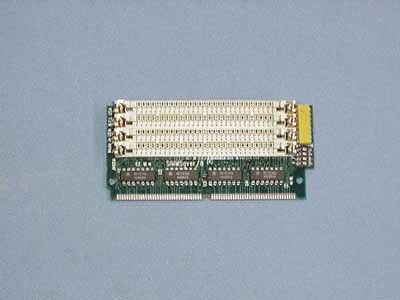
(This is an adaptor card, just to show what the slots look like.)
Checking these memory cards may still sort it all out for you, I've certainly had older systems "lose" access to some memory after disuse and be fixed this way.
Another possibility is the configuration in the CMOS setup may still be wrong, especially if the backup battery went flat (mostly they charge up again on older systems, unless the battery has failed). Some older BIOS's need you to enter the CMOS setup using the correct key (eg Del or maybe F1, F2 etc, it usually says on the screen at start), before they will check the hardware configuration and update.
If you access the CMOS setup, see how much memory it says there is, and if it is a larger figure than 512K, save when you exit. Then see if the clicker still only counts 512K before it goes on to run DOS (ie don't press ESC to stop it doing the long count of the rest of memory). If it still only shows 512K, then it seems to definitely be a hardware problem.
The shadowing is disabled because, like MEMMAKER, it needs memory above 640K in order to work, at the moment it has none available.
Pleased to have been a Microsoft MVP (Windows Desktop Experience) 2007/8, 2008/9
-
October 26th, 2005, 12:22 PM
#10
Originally Posted by Platypus
Heh, it can be a bit challenging tackling hardware at first. The boards you've checked so far are your expansion cards, eg video card, I/O card. The memory cards are much smaller, the sizes I've mentioned similar to this:

They are most likely held in slots on the mainboard, with small clips at each end, like the ones here:
(This is an adaptor card, just to show what the slots look like.)
Checking these memory cards may still sort it all out for you, I've certainly had older systems "lose" access to some memory after disuse and be fixed this way.
Another possibility is the configuration in the CMOS setup may still be wrong, especially if the backup battery went flat (mostly they charge up again on older systems, unless the battery has failed). Some older BIOS's need you to enter the CMOS setup using the correct key (eg Del or maybe F1, F2 etc, it usually says on the screen at start), before they will check the hardware configuration and update.
If you access the CMOS setup, see how much memory it says there is, and if it is a larger figure than 512K, save when you exit. Then see if the clicker still only counts 512K before it goes on to run DOS (ie don't press ESC to stop it doing the long count of the rest of memory). If it still only shows 512K, then it seems to definitely be a hardware problem.
The shadowing is disabled because, like MEMMAKER, it needs memory above 640K in order to work, at the moment it has none available.
Yep, the Base Memory Size is 512KB at bootup. Ext. Memory Size 0KB, and I let the "clicker" go right to the end and still only reaches 512KB.
Here's something that might help: when I press DEL to access the RUN CMOS SETUP, I also get two other options, namely EXIT FOR BOOT and RUN XCMOS SETUP.
Clicking RUN XCMOS SETUP brings up the following screen:
NEAT CHIPSET SETUP PROGRAM MAIN MENU with five further options:
EASY NEAT CHIPSET REGISTER SETUP
ADVANCED NEAT CHIPSET REGISTER SETUP
ENABLE/DISABLE AND MAIN BIOS SHADOW
WRITE CMOS REGISTERS AND EXIT
DO NOT WRITE CMOS REGISTERS AND EXIT
Clicking the "EASY NEAT..." and "ADVANCED NEAT..." options brings up:
WARNING--IMPROPER USE OF THE SETUP MAY CAUSE THE SYSTEM TO FAIL NORMAL OPERATIONS!
IF THE SYSTEM FAILS, PRESS AND HOLD THE <INS> KEY, AND TURN THE MACHINE OFF AND THEN ON!
RELEASE THE <INS> AFTER MEMORY TEST STARTS!
HIT <ESC> TO STOP NOW!
HIT <ENTER> TO CONTINUE!
Clicking the "ENABLE/DISABLE..." option brings up the following screen:
SETUP SHADOW RAM FOR 812
MAIN BIOS SHADOW AT F0000H,64K ->0
VIDEO BIOS SHADOW AT C0000H,16K ->0
VIDEO BIOS SHADOW AT F4000H,16K ->0
To the right of the above is an instruction sidebar that says:
Go to Prev/Next Register - (up and down arrows)
Go to Prev/Next Entry - (left-right arrows)
Scroll Bit Value - (PgUp/PgDn)
Return to Main Menu - (ESC)
Beneath this is a toggle option:
1=SHADOW ENABLE
0=SHADOW DISABLE
This toggle refers to the zeros at the end of the lines MAIN BIOS SHADOW and VIDEO BIOS SHADOW that the up and down arrows can access, however, nothing I click on this screen will bring up the "1-SHADOW ENABLE".
It continues to stay at 0 (zero).
Clicking on the next two options, "WRITE CMOS REGISTERS", and "DO NOT WRITE CMOS REGISTERS" simply cause the computer to reboot.
I have a hunch this is where I screwed up before losing my 640KB--such HUGE memory, right? :-)
I'll bet I can recover from here somehow, although I don't understand why I am unable to toggle between that 1 and 0 at the end of the "Shadow" lines.
Hmmm...this is becoming curiouser and curiouser... ;-)
Tell me I'm getting closer to the truth or that I am a true "cyber-dummy"?
-
October 26th, 2005, 05:58 PM
#11
The system has to have more than 640K of RAM available before shadowing can work, as it uses upper memory, in the top 384K of the first megabyte. Until the memory can physically be accessed, those features can't be enabled.
I think you'll have to find those memory cards on the system board and check them out.
Pleased to have been a Microsoft MVP (Windows Desktop Experience) 2007/8, 2008/9
-
October 26th, 2005, 09:36 PM
#12
Originally Posted by Platypus
The system has to have more than 640K of RAM available before shadowing can work, as it uses upper memory, in the top 384K of the first megabyte. Until the memory can physically be accessed, those features can't be enabled.
I think you'll have to find those memory cards on the system board and check them out.
All right, I'll do that. I presume these memory cards--which I see are similar to the ones in my laptop--are still available new if I need to replace them?
Or maybe a local computer shop can test my memory boards and find me some used but working replacements lying on the floor somewhere.
;-)
-
October 26th, 2005, 09:47 PM
#13
Can you go into the CMOS settings Easy and Advanced and post back what options can be set in there ?
I had an old 486sx33 that my brother in law lent us and when he gave it to us it had 4 sticks of 1Mb ram.
Being the 30 pin type you had to upgrade in groups of 4 and I finally picked up 4 x 4mb to fill the remaining 4 slots taking the total to 20Mb.
From memory there was a setting in the CMOS that was something along the lines of Disable Memory above 16Mb or something weird like that.
I'm just wondering if there's something similar going on with yours because the CMOS got reset.
P.S. The same machine went into storage for about 14 months and when it cam out the CD-Drive no longer worked, span up etc but just wouldn't read or anything. So components do spontaneouly fail in storage.
-
October 26th, 2005, 10:22 PM
#14
Originally Posted by Nix
Can you go into the CMOS settings Easy and Advanced and post back what options can be set in there ?
I had an old 486sx33 that my brother in law lent us and when he gave it to us it had 4 sticks of 1Mb ram.
Being the 30 pin type you had to upgrade in groups of 4 and I finally picked up 4 x 4mb to fill the remaining 4 slots taking the total to 20Mb.
From memory there was a setting in the CMOS that was something along the lines of Disable Memory above 16Mb or something weird like that.
I'm just wondering if there's something similar going on with yours because the CMOS got reset.
P.S. The same machine went into storage for about 14 months and when it cam out the CD-Drive no longer worked, span up etc but just wouldn't read or anything. So components do spontaneouly fail in storage.
No, I see nothing similar to what you're referring to.
In any case, the toggling capability between options 1 and 0 for line items in these screens is somehow disabled. Even if I knew what I was doing and wanted to change any of those settings from 0 to 1, it wouldn't work. I just get a beep when I use the PgUp/PgDn buttons which are supposed to toggle. The zeros I want to toggle into ones remain as zeros.
I'll check out those memory cards first and see what happens.
Not the end of the world. Still, it's good to learn a thing or two. Who knows, maybe I'll end up being able to insert more memory that I would have thought possible, but if not, I'll survive.
-
October 27th, 2005, 01:54 PM
#15
Hi, Platypus, et al...
Well, I re-opened the 386 XT cabinet and looked around for those SIMMS but couldn't see them anywhere. They certainly weren't stand-alone chips of the type you describe with 30 or 72 pins or connected by any end clips that I could see.
Perhaps this computer has its 640 KB installed in some other way. Could it be it's incorporated into the existing expansion cards and therefore soldered onto them? I didn't see anything "unclippable" from those boards, either.
There are a couple of other green boards but these are bolted into the chassis and I couldn't read any clue as to what they might be for. So much for my computer knowledge!
There is a component in this thing from just about every Asian country, and Germany as well. Don't think I've ever seen that combination before!
Too bad I'm not a computer genius. There's so much room in the box for extra cards and what-not, that I'll bet I could put this relic to better use if I only knew how. That is, if it's even worth the trouble. It may be fit for the trash, I guess. Best thing about older, larger home computers is all that extra room, and I hate throwing away perfectly good electronic equipment if it still works and if parts are still available.
Furhermore, as you know, much of the earlier equipment was built much more sturdily than the junk currently on the market! (especially VCRs!). Even my laptop that I bought in 2002 now has both its CD drives defective and virtually useless! I had to purchase an outboard replacement!
The 386 XT's 5 1/2 inch floppy drive is a dinosaur, of course, but it still works flawlessly. Long ago I transferred many of my large floppies onto 3 1/4 inch size on the adjacent drive, but there are some proprietary big floppies that I am unable to duplicate with the copier programs I have, so I'll have to throw them away at some point unless and until I ever find a way to copy them. And nobody makes a computer with ALL of these modes and CD drives in one, big computer! That would be asking too much, naturally!
I wonder how many people actually have old floppy files that they can't do anything with!
Anyway, unless anyone has any further suggestions as to how I can re-access my original 640 KB, I guess I'll just have to leave it as it is at 512 KB, and keep all of my future programs and files onto floppies. At least they'll be safer that way. Good thing I always made backups of my stuff!
You would think whoever designed the 386 XT would have considered the possibility that the upper memory could become innacessible in exactly the way it has to me! They should have built some kind of safeguard into it. How short-sighted was that?! What if someone lost important data and was unable to access it?
Surely more recent computers have such a safeguard?
Thread Information
Users Browsing this Thread
There are currently 1 users browsing this thread. (0 members and 1 guests)
 Posting Permissions
- You may not post new threads
- You may not post replies
- You may not post attachments
- You may not edit your posts
-
Forum Rules
|
|


 Reply With Quote


