|
-
February 6th, 2009, 04:14 PM
#1
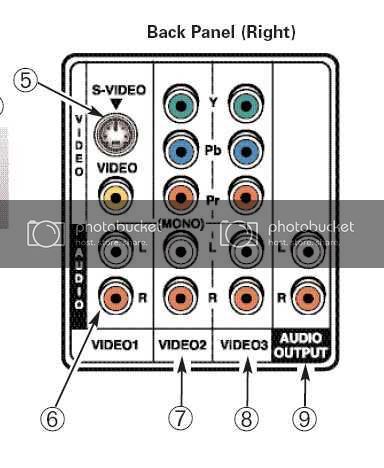
This is the back of my tv.
-
February 6th, 2009, 04:16 PM
#2
So, I'll take these cables back and get the right ones
If you need to. Depends on whether you need 5 or 3 RCA in total and if the one you bought actually has one higher quality video cable attached along with the two audio cables.
If you only need 3 in total ( 1 video, 2 audio) check to see if the yellow one seems to be a bit thicker or stiffer than the other two.. may have some faint writing on it as well indicating it's a video cable)
-
February 6th, 2009, 04:18 PM
#3
Y, Pb, Pr is component and will only be useful for DVD's.
video, L/R is composite and should work for dvd and vcr
and as I said above might mean the cable you have is ok.
-
February 6th, 2009, 05:32 PM
#4
The writing on the cable says, Solid core Video, which is the yellow cable, and multi-core audio, which are the red and white. The yellow feels a bit stiffer than the other two.
-
February 6th, 2009, 06:13 PM
#5
You said to look and see if one of the cables was thicker than the other two. Well, on close examination, the yellow is a bit thicker, and it's stiffer too.
-
February 6th, 2009, 09:25 PM
#6
Then it's ok. If you're using composite that's all you['ll need. (after you get it working  ) )
-
February 6th, 2009, 10:51 PM
#7
Thanks fink. Now I downloaded the manual, I can read to see how to hook it all up.
-
February 7th, 2009, 12:40 PM
#8
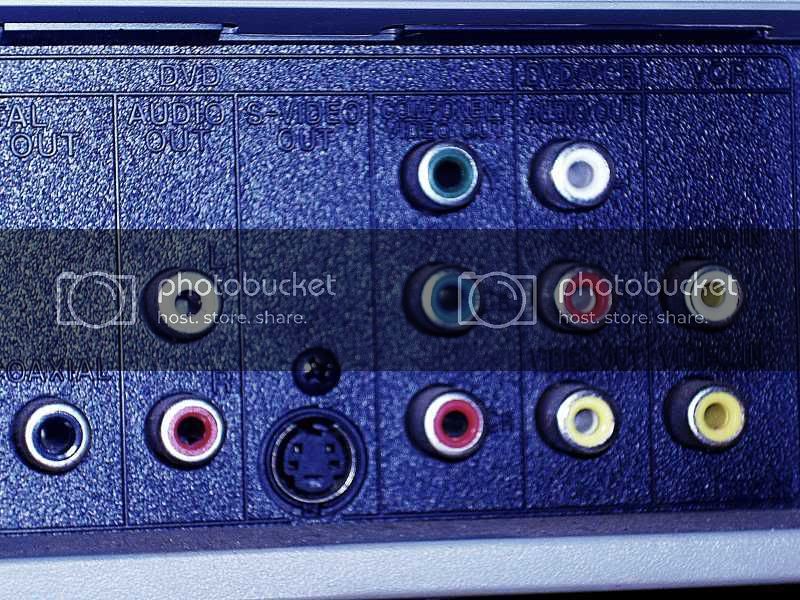
Well, I waited for nephew to find dvd/vcr book but he still hasn't done that, so I took a photo of the back of the player and I'm not sure you can see it really good.
-
February 7th, 2009, 12:43 PM
#9
what I wanted to ask is, there you see Component connections under the heading DVD, and on the far right are VCR audio. Can I hook component cables, with audio to the VCR and will that work?
According to the tv instructions, composite is only for analog signal.
One more question. I have an S-video cable, but you told me once that with S-video I would also need a separate cable for audio. Could I use the Composite cables Audio for that?
-
February 7th, 2009, 12:57 PM
#10
-
February 7th, 2009, 02:08 PM
#11
According to the tv instructions, composite is only for analog signal.
all of those connections are analog. Digital would be a totally different type of connector.
Could I use the Composite cables Audio for that?
Yup. Although in most players the s-video also only carries the DVD side of the player same as component. VCR side sends only on coax and composite.
-
February 7th, 2009, 03:13 PM
#12
Ok, but right at the moment I don't care of the VCR part works. I plan to buy a new DVD/VCR sometime in the near future.
Now I have another question. A long time ago, I had a VCR, and TV, no dvd player invented yet.  When I connected this vcr to the tv, we/I had to turn on the vcr to use the tv. When I connect these cables finally, do I still need the dvd/vcr powered on before it works? When I connected this vcr to the tv, we/I had to turn on the vcr to use the tv. When I connect these cables finally, do I still need the dvd/vcr powered on before it works?
-
February 7th, 2009, 07:24 PM
#13
Only to play and view things on the player. Cable or antenna plugged into the vcr would pass through passivley when its off so the tv will get that signal.
-
February 7th, 2009, 08:18 PM
#14
Ok, thanks fink. I've got some other things to do tomorrow but will hopefully get this tv connected sometime in the next few days.
And I think I'm going to go S-Video and use the audio from the composite cables. If that doesn't work, I'm going to best buy monday with a sister and will pick up some component and separate audio cables.
-
February 7th, 2009, 08:54 PM
#15
Based on the photos you supplied, and your dis-interest in having the VCR output, you have three options:
#1 - (best quality) - requires component (red-green-blue) and stereo (red-white) cables. Connect DVD/VCR's jacks labeled "Component Video Out" to the TV's "Video2" video jacks. Connect DVD/VCR's "Audio Out" jacks (located to the left of the component jacks) to the TV's "Video2" audio jacks.
#3 - (least quality) - requires composite (yellow-red-white) cable. Connect DVD/VCR's jacks labeled "DVD/VCR - Audio Out & Video Out" to the TV's "Video1" audio and video jacks. This connection scheme also allows for VCR tape playback.
What happened to option #2? Well, it's similar to option #1 (using s-video and audio cables), but if you're buying cables you might as well have the best video quality the unit can deliver, and will be the default connection for any DVD player.
As for what you have to select on the television, that depends on the make/model. Look in the manual for selecting between video inputs. Option #1 would likely be labeled "Input 2", "Video 2", "DVD 1" or "Component 1". Option #3 would likely be labeled "Input 1", "Video 1", "VCR", "SVHS" or "Composite".
And please don't encourage Best Buy by buying cables there (www.monoprice.com is your friend). They charge three to five times what other charge. While heavy (thick) cables offer more shielding from induced electrical noise, don't ever pay for "pure copper" or "oxygen free" labeled cables -- they're a scam (although legal).
<edit> Oh, and no you won't need to have the DVD/VCR on in order to watch a signal coming in from the coaxial connection. But I didn't see that on your diagram of the TV's connections. This is a TV (with tuner), and not just a monitor, isn't it?
Last edited by prouton; February 7th, 2009 at 08:58 PM.
Thread Information
Users Browsing this Thread
There are currently 1 users browsing this thread. (0 members and 1 guests)
 Posting Permissions
- You may not post new threads
- You may not post replies
- You may not post attachments
- You may not edit your posts
-
Forum Rules
|
|


 Reply With Quote


