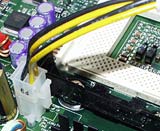
Hello again. I just bought a new power supply for an old Gateway 350 P2 machine. The old power supply was a ATX90-3405. The new comparable one which was sent to me is a Micro ATX180 watt (for Gateway). The problem is the small power connector going to the motherboard. The old one had a 2 wire, 3 holed (Female) connector. The new one has a 4 wire, 4 holed (Female) connector with 2 yellow wires and 2 black. Is there some sort of adaptor to join these 2. Thanks Nothing is easy!!!!
Thanks for the reply Supersparks. The 4 pin connector you attached is the one which came with my new power supply. The original is a 3 pin flat connector. It has 3 holes but only 2 wires attached. Is it because it is only a Pentium 2 processor?? would you like me to attach a picture of the connector and motherboard?? if so I will attach it tomorrow
OK, the connector that I showed is only needed for the latest CPU's - as you don't have a connector for it then you can just tie it up out of the way and ignore it. The other connector you describe sounds like it might be a fan speed monitor connection, and isn't very important, but it would be good if you could post a piccy just so we can be certain.
OK I tried taking a picture but I couldn't get a good quality shot. I'll post what did come out and take a better one in the daylight tomorrow. The picture shows 2 connectors, it's the smaller of the 2
Check that the new PSU itself is OK, even if you don't have a meter, you can use these instructions to see if it will fire up when the pins are shorted:
Supersparks you were right from the get go. according to the power supply manufacturer it is a fan controller, not needed. But I still have no power. Anything I should be checking?? Motherboard bad?? Thanks
Is the power switch on the front panel working? It provides the "shorted pins" effect mentioned by SuperSparks, so if it no longer functions, the system will not start.
The computer just died that is why I changed the PSU and wouldn't you know it it didn't help one bit! When I press the power on switch in front of the tower nothing happens, nothing lights up
Well I'd try what I said above, and just make sure that the new PSU fires up when the PSU connector pins are shorted. But it does sound like a major component failure here. If the PSU is OK, then disconnect everything except the power connection to the mobo, the front panel connectors, the CPU, RAM and graphics card. If it still won't fire up then try removing the motherboard from the case and placing it on insulating material to eliminate the possibility of short circuits. If the PC still won't start, try substituting a different graphics card. If it's no go after that it is almost certainly motherboard or CPU failure.


 Reply With Quote