|
-
February 8th, 2009, 06:37 PM
#1
sound/audio editor
I have to do it one step at a time: I found Kantaris, which plays steaming audio, then I found Hi-Q Recorder which can record streaming audio in MP3 format. However, it saves long (hours of recording) as a single file, so if I do not like a song, I cannot find and delete it. I was told that "a sound editor" can split a "chain" of songs into separate editable files, based on silence intervals.
Does it exist? If YES, which one can you recommend?
I am not a musician, so editing of particular songs is not a requirement.
frustrated yurka
-
February 8th, 2009, 07:22 PM
#2
Audacity (freeware) has a silence finder option that will attempt to label the track split points based on silence between the tracks.
See, http://audacityteam.org/wiki/index.p...eparate_tracks
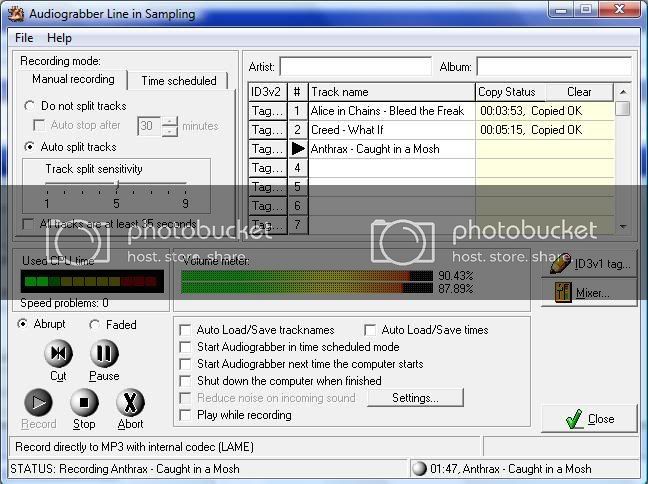
If you use Audiograbber also freeware, it can auto split tracks as it records (assuming there is some kind of silence between tracks.
You can either label the tracks as you go if you are at the computer when recording, or it will save the files with temporary names you can change later.
Note, if you want to add mp3 tags as opposed to simply changing the file name, then you can use any number of freeware tag editors to do this.
This is a screen grab of music i am recording from Deezer Radio (hard), a cool little widget you can add to the Opera browser.
Current PC
Zoostorm
Windows 7 Home Premium 64bit, (XP Mode virtual pc enabled)
WEI 7.4, 7.6, 7.9, 7.9, 5.9
Intel Core i5-2310, 8GB Ram
Geforce GTX 660 OC
Samsung Syncmaster SA300 23.6" monitor
Folding@home
User Name Sintares
Team guru3d
There is no such thing as overkill. 'Open fire' and 'is it dead?' are the only sane options when threatened.
-
February 8th, 2009, 08:07 PM
#3
I had bad experience with Audacity: almost anything I had to do required some kind of additional files that could not be found. Some of the files were already present, but... never mind - A. still required them, again and again.
Audiograbber needs LAME encoder that didn't load. Perhaps, should try it again. I also vaguely remember, it required a whole list of additional files, about 12 of them. Very intimidating.
frustrated yurka
-
February 8th, 2009, 10:53 PM
#4
Um, no idea what files you would be missing for audiograbber, been using it since Win98FE days.
All it requires is the lame_enc.dll, which is linked to on the audiograbber download page, you don't have to "load" anything, just make sure its in the same folder as the program.
Mp3directcut , http://mpesch3.de1.cc/ , also has a pause detect function.
Load the file, Special - pause detection, then let it analyse the file.
It places cue marks at the detected pauses, then simply File - save split, and each track marked by the cues will be saved out to a new track 1-track 2 etc
Current PC
Zoostorm
Windows 7 Home Premium 64bit, (XP Mode virtual pc enabled)
WEI 7.4, 7.6, 7.9, 7.9, 5.9
Intel Core i5-2310, 8GB Ram
Geforce GTX 660 OC
Samsung Syncmaster SA300 23.6" monitor
Folding@home
User Name Sintares
Team guru3d
There is no such thing as overkill. 'Open fire' and 'is it dead?' are the only sane options when threatened.
-
February 9th, 2009, 01:02 PM
#5
Audiograbber copies music tracks from CDs. If I need to copy a CD, I use an ancient copy of Roxio (5.3.1.154) which makes a copy in 2-3 min.
I download music from the Net. Most programs, like eDonkey, save everything in a single folder as separate files, i. e. each file contains a single melody. If needed, I use MP3 Equalizer to adjust volume before I burn anything to a CD. Kantaris is very convenient and simple gizmo to LISTEN to music as an FM program but then it saves (to iTunes) only songs titles, not the music itself. So, I was going to use HiQ Recorder to record streaming audio. It does that but the entire recording session is saved as one file, i. e. there is no way to delete a song I don't like or even to minimally edit songs (to shorten silence periods between songs or to add fading to the endings). I tried to find ways to separate streaming audio recorded from the net with A., so far 0 results; I even could not import audiofile, it appears that A. can only import CD tracks from physical CD in the drive.
I keep trying.
frustrated yurka
-
February 9th, 2009, 01:28 PM
#6
Yes, I never said Audiograbber could import mp3s and split them based on silences between songs ( I use audacity or mp3directcut for that ), i was pointing out the use of Audiograbber as a program that can also record audio from anything you are listening to on the computer (just like HiQ recorder), ie listen to your streaming audio via WMP or whatever else you use and audiograbber can record the sound.
However unlike HiQ Recorder (free) it can autosplit the tracks based on the silence between each track.
You can even schedule it to start recording at a particular time.
Now if you upgrade to the paid version of HiQ recorder it can separate out the songs at least according to the makers web page.
Have you tried Mp3directcut?
Just load the recorded mp3 file and as show above, it will try to mark the mp3 into separate songs depending on the pauses between tracks, you can then save out the tracks into individual tracks.
You can then use you favourite mp3 tagging program to enter the tags and rename the tracks as you see fit.
Last edited by General Winters; February 9th, 2009 at 01:34 PM.
-
February 15th, 2009, 08:59 PM
#7
I gave up on Kantaris and, as a result, I don't have to split anything. Besides, Kantaris has a very primitive search engine.
Anyway, I have a new problem. Some (very few, indeed) files begin very soft, so I have to pump up their volume, but after awhile they sound normal, so I have to lower the VU. Is there a VU normalizer that is capable to equalize the VU within a single file? MP3Gain normalizes VU in a bunch of files. And, BTW, I am not talking about pieces, such as Bolero, where soft beginning was intended by the author.
frustrated yurka
Thread Information
Users Browsing this Thread
There are currently 1 users browsing this thread. (0 members and 1 guests)
 Posting Permissions
- You may not post new threads
- You may not post replies
- You may not post attachments
- You may not edit your posts
-
Forum Rules
|
|


 Reply With Quote


