how do i remove ask.com...?
Page 1 of 3 123 LastLast
Results 1 to 15 of 35

Thread: how do i remove ask.com...?

Hybrid View

  1. #1
    Join Date
    Mar 2000
    Location
    Toronto, Canada
    Posts
    520

    how do i remove ask.com...?

    I am using IE7 on a Vista machine. Google is my preferred search engine. Any entry in the search bar (the IE7 search bar) uses Google. If, however, I type a search word or phrase into the address bar, IE7 uses Ask.com as the default search engine. I would like to change this. I have looked in the internet option settings of IE7 and in the Add/Remove programs area of Vista. No luck.
    Can someone help me out?
    Thanks.
    K
    HP Pavilion DV2610 - AMD Turion 1.9GHz, 2Gb RAM
    Vista Home Premium

  2. #2
    Join Date
    Sep 1999
    Location
    Clearwater, Fl.
    Posts
    22,610
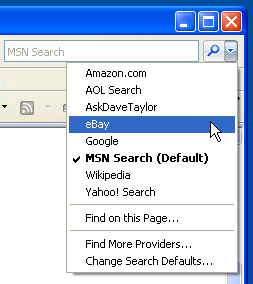
    IE Tools->General Tab->"Change Search Defaults"
    If you're happy and you know it......it's your meds.

  3. #3
    Join Date
    Mar 2000
    Location
    Toronto, Canada
    Posts
    520
    Thanks for the reply, Steve. Aleardy looked there. Google is the only search engine listed. Is a registry hack necessary?
    HP Pavilion DV2610 - AMD Turion 1.9GHz, 2Gb RAM
    Vista Home Premium

  4. #4
    Join Date
    Apr 2000
    Location
    Sheboygan, WI
    Posts
    53,391
    Change default search engine in Internet Explorer 7


    http://windowsaddict.blogspot.com/20...engine-in.html

  5. #5
    Join Date
    Mar 2000
    Location
    Toronto, Canada
    Posts
    520
    Thanks Train, but I tried that too. Ask.com isnt even listed as a search option there. Google is the only one listed.
    I actually looked at the registry and there is a reference to Ask.com at HKey Local Machine, Software, Microsoft, Internet Explorer, SearchScopes
    although I dont know whether that is the issue and how to change it.
    HP Pavilion DV2610 - AMD Turion 1.9GHz, 2Gb RAM
    Vista Home Premium

  6. #6
    Join Date
    Apr 2000
    Location
    Sheboygan, WI
    Posts
    53,391
    Have you now changed it here.


    It should say Google when you start.

    How to the changes with graphics.
    http://www.askdavetaylor.com/change_...rer_7_ie7.html

  7. #7
    Join Date
    Mar 2000
    Location
    Toronto, Canada
    Posts
    520
    The only thing that exists there is Google.
    HP Pavilion DV2610 - AMD Turion 1.9GHz, 2Gb RAM
    Vista Home Premium

  8. #8
    Join Date
    Apr 2000
    Location
    Sheboygan, WI
    Posts
    53,391
    Go through and set google up again and see if that fixes things.

  9. #9
    Join Date
    Dec 2007
    Location
    Daly City, CA
    Posts
    22,550
    Uninstall it through Add\Remove
    Most likely, it's listed as "AskToolbar", or something similar.

  10. #10
    Join Date
    Mar 2000
    Location
    Toronto, Canada
    Posts
    520
    OK, figured I would take another stab at this. It is one of those things that just bugs me.
    Train, I tried going through the process again to establish Google as my default search engine. Searches entered in the IE7 search bar do go through Google. Searches enterred in the address bar get redirected through Ask.com.
    Broni, as mentioned in my original post, I looked in Add/remove. There doesnt seem to be anything there that relates to ask.com.
    HP Pavilion DV2610 - AMD Turion 1.9GHz, 2Gb RAM
    Vista Home Premium

  11. #11
    Join Date
    Jun 2005
    Location
    Ft Myers FL
    Posts
    8,520
    It may be listed as Ask Jeeves.

  12. #12
    Join Date
    Dec 2007
    Location
    Daly City, CA
    Posts
    22,550
    Download HijackThis:
    http://www.snapfiles.com/get/hijackthis.html
    and post its log.
    We'll find "the guy".

  13. #13
    Join Date
    Mar 2000
    Location
    Toronto, Canada
    Posts
    520
    Broni,
    Awesome suggestion. I completely forgot about Hijackthis. It's been at least a couple of years since I used it, and certainly never on this machine. It immediately identified and removed the Ask.com browser helper. Now maybe I will go back to the log and see if there is anything else there that catches my eye.
    Thanks again.
    K
    HP Pavilion DV2610 - AMD Turion 1.9GHz, 2Gb RAM
    Vista Home Premium

  14. #14
    Join Date
    Aug 2008
    Posts
    1
    MAgill, I all ready run this scan, my problem its on mozilla firefox, I dont found anything that says ask browser or something like that, can u tell me wich names appeared on your computer? thanks

  15. #15
    Join Date
    Nov 2008
    Location
    Milwaukee
    Posts
    2

    ASK.COM has taken over FireFox

    Quote Originally Posted by RichMX View Post
    ...my problem its on mozilla firefox, I dont found anything that says ask browser or something like that...
    I'm in the same boat. FireFox will not allow me to change my homepage away from ASK.COM. I can make the change in TOOLS->OPTIONS, but when I close FireFox ASK.COM takes over, and the next time I load FireFox, ASK.COM is there once again!?!?!?

    IE7 will accept the change, FireFox 3 will not.

    Here's what I have done:
    • Inside my registry, I removed ASK.COM.
      I removed the ASK Toolbar from CONTROL PANEL->ADD/REMOVE PROGRAMS.
      I used HighJackThis to view BHO's; ASK.COM is not there.
      I visited ASK.COM's FAQ....... #7 ("How can I find____?") does not apply.


    FireFox just will not let go of ASK.COM!

    BTW, no new topic needed, it's still the same thing: ASK.COM.

    Any help will be greatly appreciated!
    Attached Files Attached Files

Thread Information

Users Browsing this Thread

There are currently 1 users browsing this thread. (0 members and 1 guests)

Posting Permissions

  • You may not post new threads
  • You may not post replies
  • You may not post attachments
  • You may not edit your posts
  •