|
-
November 29th, 2004, 02:09 AM
#1
Primary Slave Drive ATAPI Incompatible
Built a new system today, or rather, bought the bits and a buddy put it together:
ASUS P5GD1 board
P4 2.8
2 x King Max 256
ATI 600 Pro
Maxtor 80G SATA
System ran fine untill I installed a Maxtor 40G IDE drive set as primary slave from my old system so I could copy over some stuff. On boot I get ATAPI Incompatible message. I disconnected the drive and restarted with last good config. From searching this board I'm wondering if the ribbon cable is backwards - I'll try reversing it tomorrow. Other than that, any suggestions of what it could be?
Thanks.
HP Pavilion DV2610 - AMD Turion 1.9GHz, 2Gb RAM
Vista Home Premium
-
November 29th, 2004, 02:20 AM
#2
If the ribbon is an older cable 40-pin, and not an 80-pin, might check that too.
What O/S?
-
November 29th, 2004, 02:36 AM
#3
The ribbon is an older one that my friend had - I dont know if it is 40 or 80 pin though it seems to be the same size as the slot it goes into on the board. OS is XP Pro.
HP Pavilion DV2610 - AMD Turion 1.9GHz, 2Gb RAM
Vista Home Premium
-
November 29th, 2004, 02:37 AM
#4
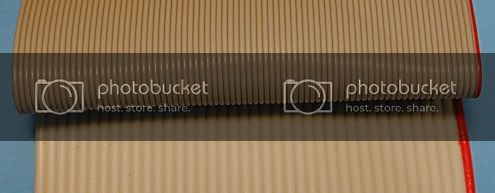
The black connectors are the same, but the wires inside are different. The two together below shows the 80pin as the top one, the other is a 40pin naturally.
-
November 29th, 2004, 07:58 AM
#5
Minor correction... Both the newer cables for supporting the faster UDMA modes and the older style cables have 40-pins. The newer cables (and the one you want to switch to here) have 80 wires as opposed to the older style that has 40 wires.
See what happens changing the cable, but that message is not typically the one that is displayed when an improper cable is used on a UDMA capable drive. If the message persists after changing the cable then go in to bios and make sure the detection for the primary slave (where you have your drive) is set to auto.
Please remember to post back whether your problem is resolved or
not, so that others may gain from the knowledge.
-
November 29th, 2004, 08:35 AM
#6
Thanks Doc........I meant wires......not pins.....
-
November 29th, 2004, 09:28 AM
#7
Yup, that may be it. The cable I am using is a 40. Fortunately my friend also gave me an 80. I just didnt look carefully at the two to see the distinction. I'll swap out the cables tonight and report back. THanks.
HP Pavilion DV2610 - AMD Turion 1.9GHz, 2Gb RAM
Vista Home Premium
-
November 29th, 2004, 09:33 AM
#8
If not the cable, make sure you check the BIOS setting as Doc mentioned.
-
November 29th, 2004, 09:40 AM
#9
Thanks for that. I did check last night as soon I ran into the problem. It was set to auto detect.
HP Pavilion DV2610 - AMD Turion 1.9GHz, 2Gb RAM
Vista Home Premium
-
November 29th, 2004, 03:22 PM
#10
What do you have as Primary Master as the SATA drive listed in your original post will be on a SATA controller and not an ATA controller unless you are using some kind of SATA to ATA converter.
If life was simple then it would be no fun.
Regards, Mike
-
November 29th, 2004, 03:33 PM
#11
Primary master is the Maxtor 80G drive on a serial ATA connection.
HP Pavilion DV2610 - AMD Turion 1.9GHz, 2Gb RAM
Vista Home Premium
-
November 29th, 2004, 03:37 PM
#12
Primary master is the Maxtor 80G drive on a serial ATA connection
Then the 40gb drive should be master on one of the ATA channels as the two hard drives are not on the same channel controller. It should be primary unless you also have an optical drive as master on the same ATA channel.
If life was simple then it would be no fun.
Regards, Mike
-
November 29th, 2004, 03:49 PM
#13
I do have a DVD drive set as master and CD R set as slave. The 2 opticals came out of my P3 system so I left the jumper settings the same.
So:
If the two hard drive are on separate channels, then they should both be set as masters - and this is a jumper setting?
Do I need to change the settings of the optical drives by way of jumper and/or BIOS?
HP Pavilion DV2610 - AMD Turion 1.9GHz, 2Gb RAM
Vista Home Premium
-
November 29th, 2004, 03:54 PM
#14
If I understand your posts, your setup is as follows:
SATA Channel: 80GB Master
ATA Channel: DVD Master & CDR Slave
ATA Channel: 40GB Master
You can jumper them respectively as Master/Slave for each channel or use Cable Select, always making sure the Master is on the end of the cable and the Slave is connected in the middle.
If life was simple then it would be no fun.
Regards, Mike
-
November 29th, 2004, 03:57 PM
#15
Thanks for that. I'll fiddle with things this evening and report back.
Thanks again.
HP Pavilion DV2610 - AMD Turion 1.9GHz, 2Gb RAM
Vista Home Premium
Thread Information
Users Browsing this Thread
There are currently 1 users browsing this thread. (0 members and 1 guests)
 Posting Permissions
- You may not post new threads
- You may not post replies
- You may not post attachments
- You may not edit your posts
-
Forum Rules
|
|


 Reply With Quote


